Layout of the edition page

Every page for elements configuration are organized in the same way.

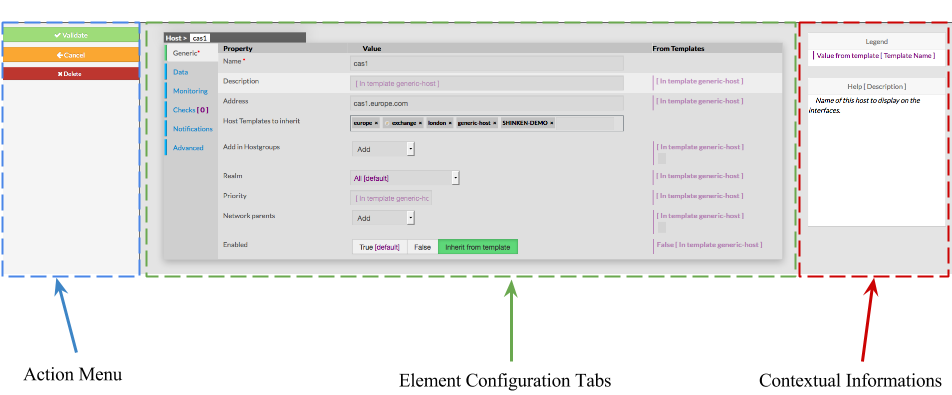
The Layout is devided in 3 sections :

  • Action Menu
  • Element Configuration Tabs
    • It contain all information of an element
  • Contextual Informations and Help


Action Menu

This Menu provides to the Administrator the common actions to Validate, Cancel, or Delete the selected object.

    • When validating a configuration, the object will be placed in the list of Changes to Apply.

    • If the Administrator click on the Cancel button, every changes made after precedent saving, will be lost.

    • If the Delete button is clicked, a confirmation popup will be disaplayed, asking the Administrator to validate or cancel the deletion of object.

Element Configuration Tabs

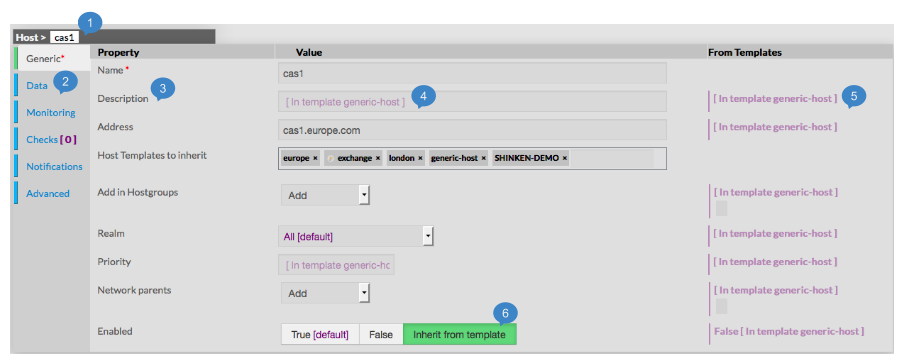
The type of the element and is name are displayed on the top of the Aera (1).


As they are numerous, elements properties are splited by category among tabs.

    • Tabs list will be different following the type of the selected element.

    • Tab layout is always the same:
  1. Categories of properties

  2. Name of Property

  3. Value of Property

  4. Value inherited from, if available

  5. Button used to activate or not Inherit from Template for Enabled property


Contextual Informations


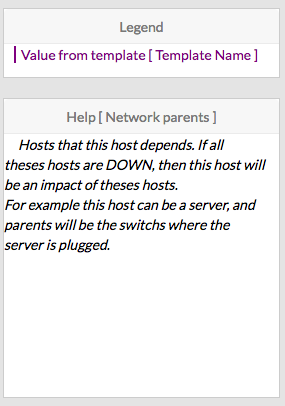
This Panel is used to help the Administrator, by showing two kind of informations  :

  • Legend : information about the whole page
  • Contextual Help : Help about a property shown when cursor points to it

To see Help about an element, simply place your cursor over this element on the page,

description and configuration help will be immediatly shown in the right box.


sqdg