Overview
Hosts configuration concerns Host elements, Host Templates and Host Groups.
Hosts are elements that will be checked, in a scheduled way, using Checks.
Host Templates represent models of Hosts. The concept of templates, is to provide a way for setting common options and properties, that will apply to several hosts. This feature gives Administrators the ability to keep an homogenous configuration, and spend less time when deploying Hosts.
Checks can be attached to templates, as well as contacts, host groups, parents and other advanced features.
Hosts can inherit from more than one templates, giving the ability to arrange templates by hardwares, operating systems, networks etc.
Hostgroups are used to arrange Hosts by groups, making ordering easier, and giving opportunities to attach checks, that will be executed on each member of concerned groups.
See Understanding host and check datas and How They Work for more informations.
Access the Hosts Configuration
Hosts Configuration can be accessed by the Main Menu "Elements". When pointing cursor over Hosts in the Main Menu, a sub menu appears, showing 3 categories : - Hosts
- Host Template
- Hostgroups
Select one of the sub categories to get into Configuration. Selecting Hosts in the Main Menu, is the same as selecting Hosts in the Sub Menu. | 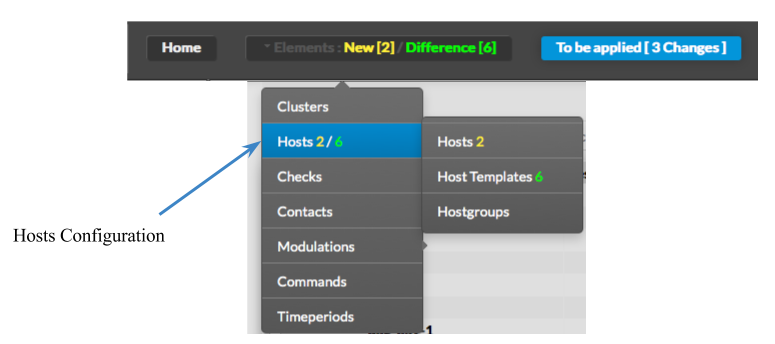
|
| | |