Overview
Notification way is used to define how contacts will be notified. As for Plugins and Commands, Notification way makes the link between the command executed and the Shinken notification that will be sent to contacts, depending of concerned element.
For exemple, if you want contact to be notified by email, all during the day, and for any host or check states, we should define the following :
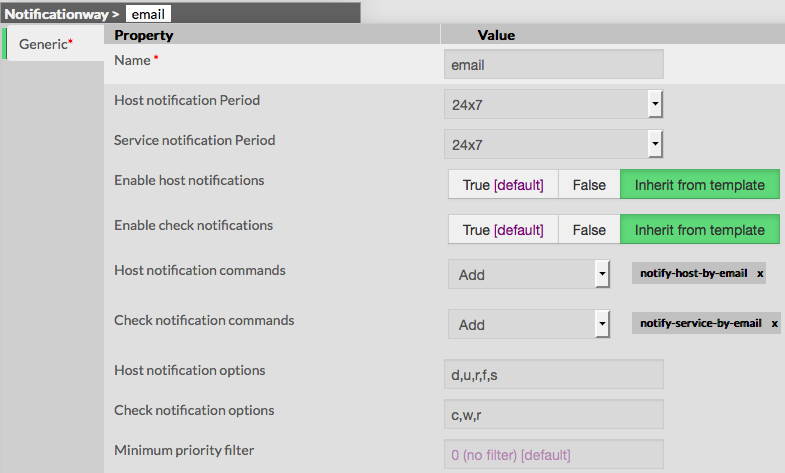
Notification can be from any type :
- send an email
- send a SMS
- turn on an alarm
- make tuxdroid shouting
| Notification Ways are available from the Contacts Menu | image |
The main page of notification ways, gives a list of all existing elements with following details : - a CheckBox used to select on or more notification ways
- differences since last commit
- name of the notification way
- Host notification Period
- Check notification Period
- Status
| image |
On the top of the table, A tool bar let Administrators the ability to : - Enable, Disable, Delete or Duplicate selected notification ways
- Filter List by Name
| image |
Add a new Notification Way
To create a new notification way, use the button "Add new [Notification Way]" located in the Action Menu.
The form displayed will is composed of one tab : - Generic, containing all necessary options
| |
The left menu give to Administrators the ability to : - Validate the new notification way
- Cancel the action
- Delete the notification way
| image |
Generic category form contains following options :
- Name
- the name of the notification way that will be used to identify and select it in other elements
- this field is required
- Host notification period
- defines the period on which host notification will be sent
- the value must be selected from the dropdown, listing all existing timeperiods
Check notification period (attention Service notification period dans l'appli)- defines the period on which check notification will be sent
- the value must be selected from the dropdown, listing all existing timeperiods
- Enable host notification
- defines if notification will be sent or not for host state changes
- Value is set to True by default
note : if value is set to False, notification way will be still used for host state changes, but no notification will be sent - Enable check notification
- defines if notification will be sent or not for service state changes
- Value is set to True by default
note : if value is set to False, notification way will be still used for check state changes, but no notification will be sent - Host notification commands
- defines the command that will be used to notify contacts when an host event occurs
- the value must be choosen from the dropdown list of available commands
- Check notification commands
- defines the command that will be used to notify contacts when a chack event occurs
- the value must be choosen from the dropdown list of available commands
- Host notification options
- defines a list of flags, used to filter states that should generate a notification
- values is a comma separated list of flags, valid values are :
- d : send a notification for a DOWN state
- u : send a notification for an UNREACHABLE state
- r : send a notification for a RECOVERY state
- f : send a notification for a FLAPPING state
- s : send a notification for a SCHEDULED DOWNTIME
- n : none, no notification will be sent if this flag is used
- if no flag is filled, any host state will generate a notification
- Check notification options
- defines a list of flags, used to filter states that should generate a notification
- values is a comma separated list of flags, valid values are :
- c : send a notification for a CRITICAL state
- w : send a notification for a WARNING state
- u : send a notification for an UNKNOWN state
- r : send a notification for a RECOVERY state
- f : send a notification for a FLAPPING state
- n : none, no notification will be sent for Check state changes
- if no flag is filled, any check state will generate a notification
- Minimum priority Filter
- This value is used to send a notification, only if the criticity is equal or higher the minimum fixed
note : this is very useful to send notification for critical systems only, for example for a gateway or a DB server | |