What is a cluster?
The main role of this feature is to allow users to have in one "indicator" the aggregation of other states. This indicator can provide a unique view for users playing different roles.
Typical roles:
- Service delivery Management
- Business Management
- Engineering
- IT support
Let's take a simple example of a service delivery role for an ERP application. It mainly consists in the following IT components:
- 2 databases, in high availability, so with one database active, the service is considered to be up
- 2 web servers, in load sharing, so with one web server active, the service is considered to be up
- 2 load balancers, again in high availability
These IT components (Hosts in this example) will be the basis for the ERP service.
With business rules, you can have an "indicator" representing the "aggregated" state for the ERP service!
Shinken Enterprise already checks all of the IT components one by one including processing for root cause analysis from a host and service perspective.
Accessing Cluster Configuration
Clusters Configuration can be accessed by the Main Menu "Elements".
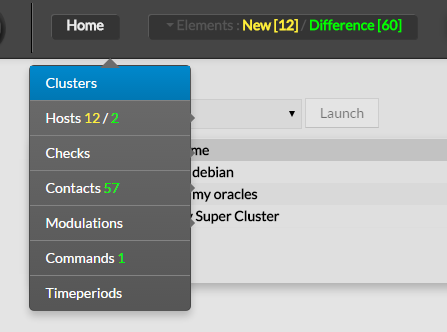
How to define Clusters
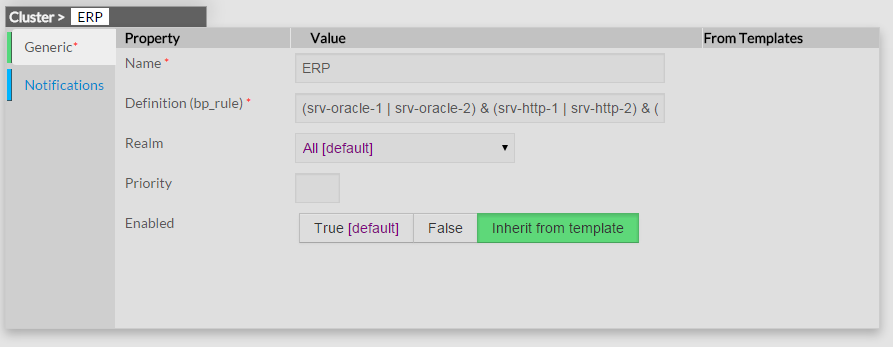
Here is a configuration for a sample ERP rule:
(srv-oracle-1 | srv-oracle-2) & (srv-http-1 | srv-http-2) & (srv-loadbalancer-1 | srv-loadbalancer-2) |
Notification logic
With "need at least X elements" clusters
In some cases, you know that in a cluster of N elements, you need at least X of them to run OK. This is easily defined, you just need to use the "X of:" operator.
Here is an example of the same ERP but with 3 http web servers, and you need at least 2 of them (to handle the load):
(srv-oracle-1 | srv-oracle-2) & (2 of: srv-http-1 & srv-http-2 & srv-http-3) & (srv-loadbalancer-1 | srv-loadbalancer-2) |
Possible values of X in X of: expressions
The X of: expression may be configured different values depending on the needs.
The supported expressions are described below:
- A positive integer, which means "at least X host should be up"
- A positive percentage, which means "at least X percents of hosts should be up".
It may be combined with Groupping expression expansion to build expressions
such as "95 percents of the web front ends shoud be up". - This way, adding hosts in the web frontend hostgroup is sufficient, and the QoS remains the same.
- A negative integer, which means "at most X host may be down"
A negative percentage, which means "at most X percents of hosts should may be down".
It may be combined with Groupping expression expansion to build expressions
such as "5 percents of the web front ends may be down".
This way, adding hosts in the web frontend hostgroup is sufficient, and the QoS remains the same.
(srv-oracle-1 | srv-oracle-2) & (srv-loadbalancer-1 | srv-loadbalancer-2) & 95% of: g:frontend |
The NOT rule
You can define a not state rule. It can be useful for active/passive setups for example. You just need to add a ! before your element name.
Aggregated state will be ok if database1 is UP and database2 DOWN on this example.
(srv-oracle-1 & !srv-oracle-2) |
Grouping expression expansion
Sometimes, you do not want to specify explicitly the hosts contained in a business rule,
but prefer use a grouping expression such as *hosts from the hostgroup xxx*.
To do so, it is possible to use a *grouping expressionwhich is expanded into hosts or services. The supported expressions use the following syntax:
flag:expression |
The flag is a single character qualifying the expansion type.
The supported types (and associated flags) are described in theses tables.
Host flags
| Flag | Expansion | Example | Equivalent to |
|---|---|---|---|
| g | Content of the hostgroup | g:webs | web-srv1 & web-srv2 & ... |
| r | Hosts which name matches regex | r:^web | web-srv1 & web-srv2 & ... |
| t | Hosts which are holding a host template | t:http | web-srv1 & web-srv2 & ... |
Check flags
| Flag | Expansion | Example | Equivalent to |
|---|---|---|---|
| r | Checks which description matches regex | regex r:^HTTPS? | web-srv1,HTTP & db-srv2, HTTPS & ... |
| t | Checks which are holding templates | t:http | web-srv1,HTTP & db-srv2, HTTPS & ... |
Examples of combined expansion expression
You want to build a business rule including all web servers composing the application frontend.
l:front,r:HTTPS? |
which is equivalent to:
web-srv1,HTTP & web-srv3,HTTPS |
You may obviously combine expression expansion with standard expressions.
l:front,h:HTTPS? & db-srv1,MySQL |
which is equivalent to:
(web-srv1,HTTP & web-srv3,HTTPS) & db-srv1,MySQL |