Description
For practical reasons, we want to be able to quickly view the status of several hosts. If it's easy with 3 hosts, it can quickly become complicated when you have a large number of hosts that have relationships with each other.
To solve this problem, we create a cluster, which is an element aggregating the state of several other elements ( hosts, checks but also other clusters ).
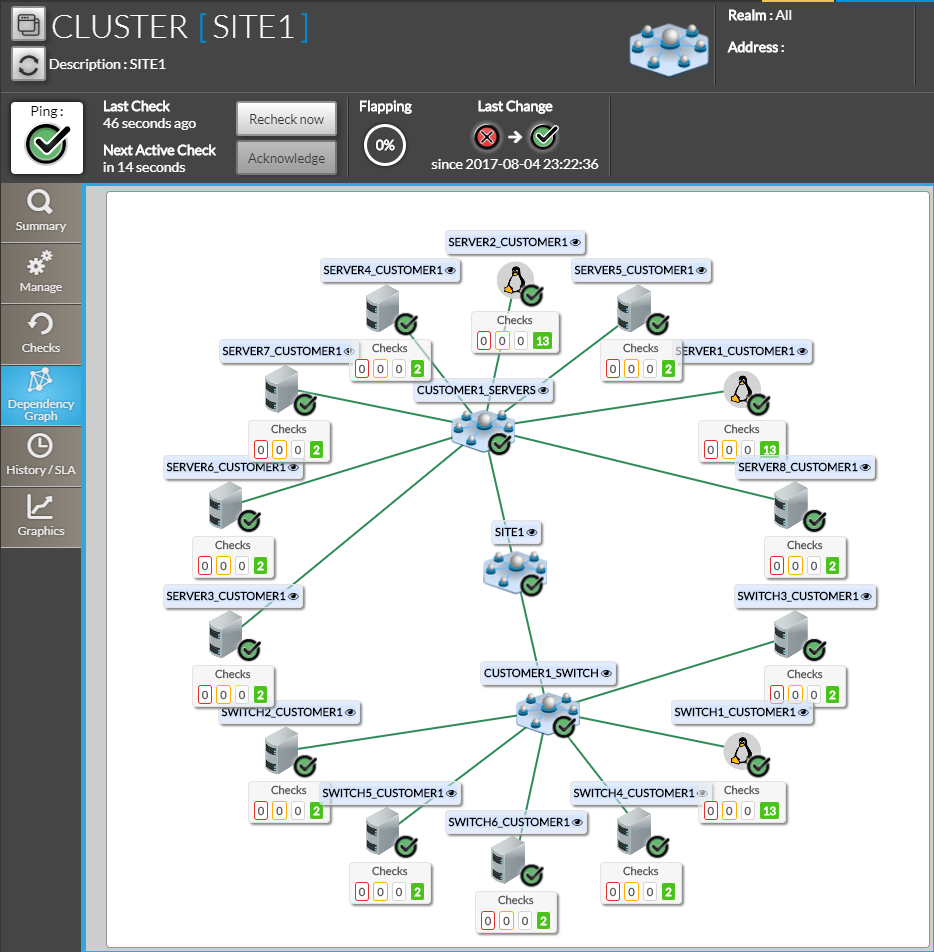
In this example, the "SITE1" cluster aggregates the status of a number of hosts. It can be used to quickly visualize the status of the servers present on an operating site as well as obtain a history and SLAs.
It is also possible to visualize which elements make up the cluster, and thus more easily detect the source of a problem thanks to this synthetic view..
Clusters share many properties with the other elements of Shinken Enterprise (hosts and checks).
- They have a status (OK, Critical, Warning, Unknown)..
- IThey can have a context ( DOWNTIME, ACKNOWLEDGD, or FLAPPING ).
- and may similarly have notifications.
The creation and configuration of a cluster is done by Shinken Enterprise administrators in the configuration UI.
|
Cluster specifics
Although clusters share many properties with hosts, some behaviors are more complex, such as the management of contexts.
Partial contexts
Clusters can have contexts that are called partial contexts..
When an element of a cluster enters, for example, a DOWNTIME Period, we want to be able to see it directly on the cluster, which is supposed to provide us with an aggregated view of its elements.
It must also be possible to differentiate between the presence of a Maintenance Period on one of the elements and the presence of a Maintenance Period on the cluster itself. This is what the partial contexts are used for..
In concrete terms, the difference between a partial context and a standard context is as follows:
- Standard context: The context is positioned directly on the cluster.
- Partial context: The context is located on one or more elements of the cluster. If a context is positioned on ALL the elements of the cluster, then we have a standard context on the cluster.
The different partial contexts that exist in Shinken are therefore as follows:
| Icone | Nom | Description |
|---|---|---|
 | PARTIAL DOWNTIME | One or more elements of the cluster are undergoing maintenance. |
| PARTIAL FLAPPING | One or more elements of the cluster are unstable. |
| PARTIAL ACKNOWLEDGE | Un or more elements of the cluster have been taken into account by users. |


The order of priority for contexts
The priority table of contexts presented in the Concept: Status & Context page can then be completed with partial contexts.
| Icone | Nom | Description |
|---|---|---|
| Aucun contexte | The element has no particular context. The status alone provides the information to describe how the element works. | |
| DOWNTIME | The item has been placed under maintenance by a user. |
| PARTIAL DOWNTIME | One or more elements of the cluster are undergoing maintenance. |
| FLAPPING | The status of the element changes very often. The element is unstable and Shinken cannot reliably determine its status. |
| PARTIAL FLAPPING | One or more elements of the cluster are unstable. |
| ACKNOWLEDGED | The item is in a status other than OK. The problem has been noticed and taken into account by a user.. |
| PARTIAL ACKNOWLEDGE | One or more elements of the cluster have been taken into account by users. |



The result of a cluster verification
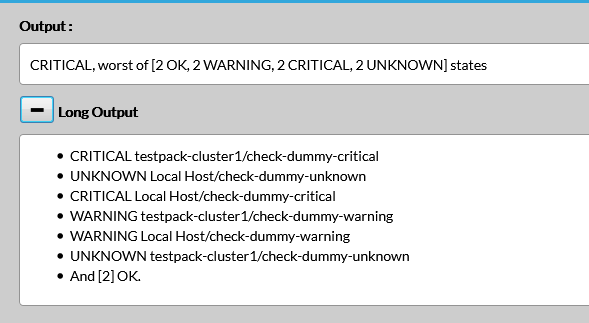
The result of the check of a cluster gives details on how the final status is calculated from the status of its elements.
- The result gives the calculation rule, and a summary version of the status of the elements. Here, we can see that the status of the cluster is CRITICAL, because it is the worst status among the status of all the elements in the cluster.
- The long result gives the status of each of the elements of the cluster.
|