Important: Only a hive or a list can be bookmarked.. |
Hives
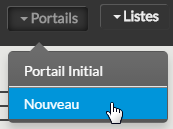
On a new hive
To create a new hive, click on the hive menu in the navigation bar and choose the "New" entry.
This action will :
- create a new view with a blank hive (default name 'New Hive').
- and automatically add a link to the new portal in your "Private" bookmarks section. (
 ).
).
Note that the "New hive" menu is not availabe if the user does not have write access to the "Private" area. (cf EN - User rights on bookmark sharing) |
|
Saving a new version of an existing hive ( make a copy )
Go to the hive you want and click on "Add to favourites" of the Navigation bar informations.
A pop-up form appears with the new name you want for this copy of the hive.
Validation of the form will:
- Create a new view with a portal that will be a clone of the current portal with the name entered in the form.
- and automatically add a link to the new portal in your "Private" bookmarks section. ().
|

Mettre la popup
|
Lists
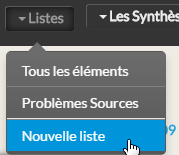
Create a new list
To create a new list, click on the "lists" menu in the navigation bar and choose the "New list" entry.
This action will :
- create a new view with a list configured to default settings (default name 'New list').
- and automatically add a link to the new list in your "Private" bookmarks section. (
 ).
).
Note that the "New list" menu is not availabe if the user does not have write access to the "Private" area. (cf EN - User rights on bookmark sharing) |
|
Saving a new version of an existing list ( make a copy )
Go to the live you want and click on "Add to favourites" of the Navigation bar informations.
A pop-up form appears with the new name you want for this copy of the list.
Validation of the form will:
- Create a new view with a list that will be a clone of the current list with the name typed in the form.
- and automatically add a link to the new list in your "Private" bookmarks section. ( list or root problems list
 )
)
|
Mettre la popup
|