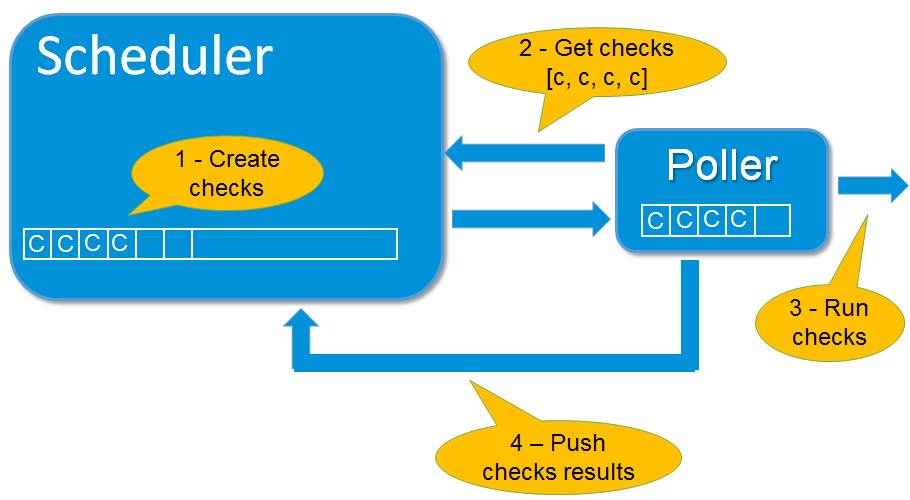
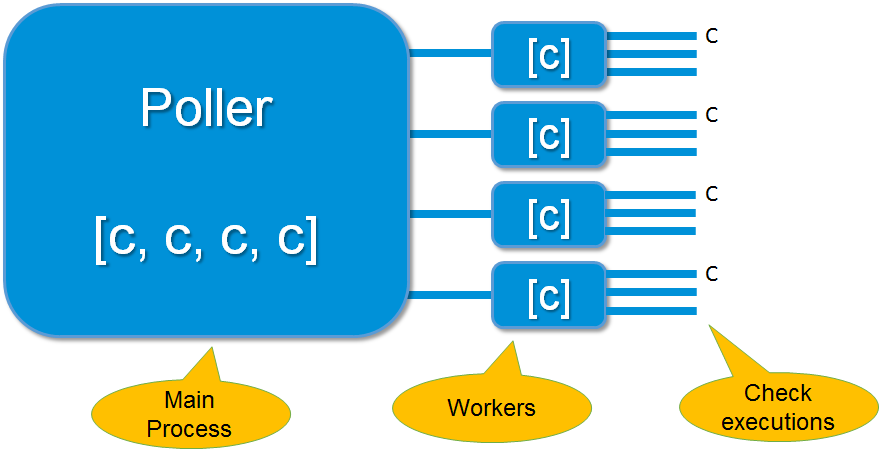
The poller daemon launches check plugins as requested by schedulers. When the check is finished it returns the result to the schedulers. Pollers can be tagged for specialized checks (ex. Windows versus Unix, customer A versus customer B, DMZ). There can be many pollers for load-balancing or hot standby spare roles.
The poller get its configuration from the Arbiter daemon, by default on its 7771 port.
The configuration is the realm scheduler list where the poller will have to connect.
It's possible to set poller in a DMZ zone, and the schedulers into the LAN. In this situation, the goal is to avoid DMZ (poller) to LAN (schedulers) connexions. In this case, it's possible to set the poller as passive. In this case, the scheduler will open a connexion to the poller.
This is the recommanded setup in a DMZ.
Only checks for host in this DMZ will be launched by this poller.
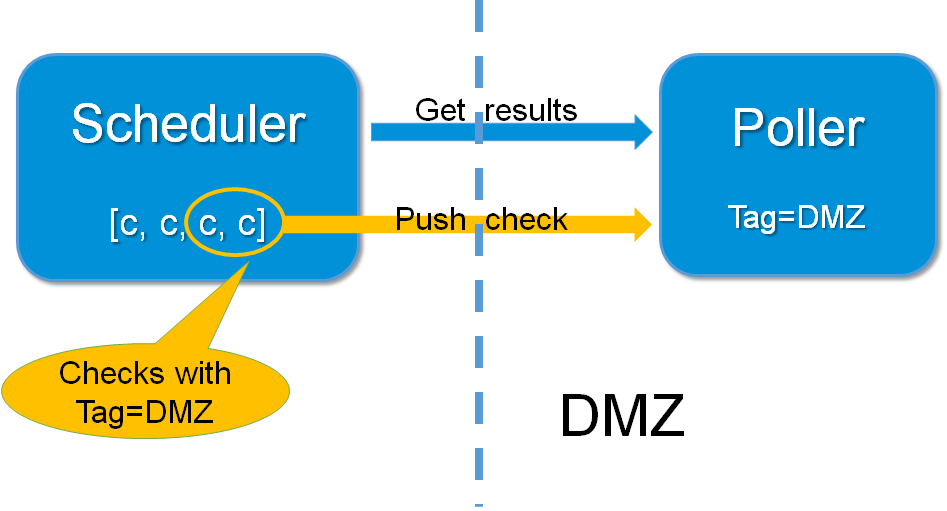
The poller get command from the schedulers.
It's important to note that the plugins launched by the pollers will have a direct access to the monitored hosts, and they will need to get data from them.
| source | Destination | Port | Protocol | Note |
|---|---|---|---|---|
| Poller | Scheduler | 7768 | HTTPS |
The current Shinken Enterprise architecture is useful for someone that uses the same type of poller for checks. But it can be useful to have different types of pollers. We already saw that all pollers talk to all schedulers. In fact, pollers can be "tagged" so that they will execute only some checks.
This is useful when the user needs to have hosts in the same scheduler (like with dependencies) but needs some hosts or checks to be checked by specific pollers (see usage cases below).
These checks can in fact be tagged on 3 levels :
The parameter to tag a command, host or service, is "poller_tag". If a check uses a "tagged" or "untagged" command in a untagged host/check, it takes the poller_tag of this host/check. In a "untagged" host/check, it's the command tag that is taken into consideration.
The pollers can be tagged with multiple poller_tags. If they are tagged, they will only take checks that are tagged, not the untagged ones, unless they defined the tag "None".
It's mainly used when you have a DMZ network, you need to have a dedicated poller that is in the DMZ, and return results to a scheduler in LAN. With this, you can still have dependencies between DMZ hosts and LAN hosts, and still be sure that checks are done in a DMZ-only poller.
| Property | Default | Description |
|---|---|---|
| poller_name | N/A | This variable is used to identify the *short name* of the poller which the data is associated with. |
| address | N/A | This directive is used to define the address from where the main arbier can reach this poller. This can be a DNS name or a IP address. |
| port | 7771 | This directive is used to define the TCP port used bu the daemon. |
| spare | 0 | This variable is used to define if the poller must be managed as a spare one (will take the conf only if a master failed). |
| realm | N/A | This variable is used to define the realm where the poller will be put. If none is selected, it will be assigned to the default one. |
| manage_sub_realms | 0 | This variable is used to define if the poller will take jobs from scheduler from the sub-realms of it's realm. |
| poller_tags | None | This variable is used to define the checks the poller can take. If no poller_tags is defined, poller will take all untagued checks. If at least one tag is defined, it will take only the checks that are also taggued like it. By default, there is no poller_tag, so poller can take all untagued checks (default). |
| modules | N/A | This variable is used to define all modules that the scheduler will load. |
define poller{
   poller_name           Europe-poller
   address               node1.mydomain
   port                  7771
   spare                 0
   manage_sub_realms     0
   poller_tags           DMZ, Another-DMZ
   modules               module1,module2
   realm                 Europe
   min_workers           0 ; Starts with N processes (0 = 1 per CPU)
   processes_by_worker   256 ; Each worker manages N checks
   polling_interval      1 ; Get jobs from schedulers each N seconds
} |