Description

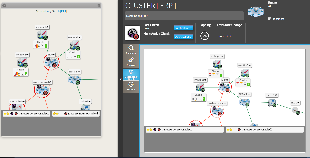
This tab shows the dependency tree of a host or a cluster. 

It has the same behaviour as the Widget Dependency Graph.


  • The 2D tree starts from the chosen element (host or check), and displays dependency links:
  • A Node will be the representation of either a host, a cluster or a check.
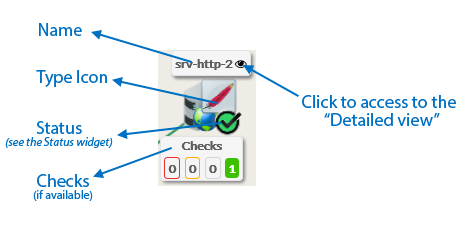
  • Each element has 4 components:


  • Its name.
  • Its icons representing its type.
  • Its status (icon state => see the Status & Context for the list).
  • If the elements is a host, available Checks will be displayed in 4 boxes below
    sorted by their status (Critical, Warning, Unknow, Ok).
  • You can access to the “Detailed view” of this element by clicking on the eye icon.
 
  • If, in the dependency graph, there are some elements not in “OK” state, they will be listed at the bottom of the graph.
 

Usage

You can navigate in the tree to see the dependencies.

Shift the tree

  • Maintain the left or right mouse button pressed to shift the tree in the 4 directions.
 

 Center the tree on not OK elements displayed in the bottom list

  • Click on the element name to center on this element.
 

Re-Center on the chosen element

  • To come back to the monitored element, press on the reload button.
 

Open the detailed view of a specific node

 
  • You can access to the “Detailed view” of this element by clicking on the eye icon, near to the name of the node.