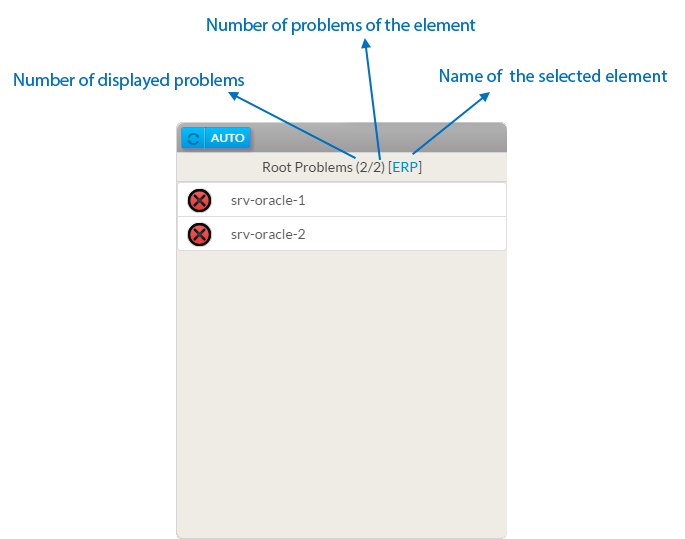
This widget displays the list of the Root Problems linked to an element.
- The widget title bar indicates:
- the number of displayed problems.
- the number of problems of the element.
- the name of the reference element
- In the list of root problems, each line displays:
- Status and context
- The name of the element
In the exemple, 2 hosts are the roots problems of the ERP status. - So first select the ERP via the configuration window
- All elements that prevent the ERP to run correctly will then will be displayed.
|  |
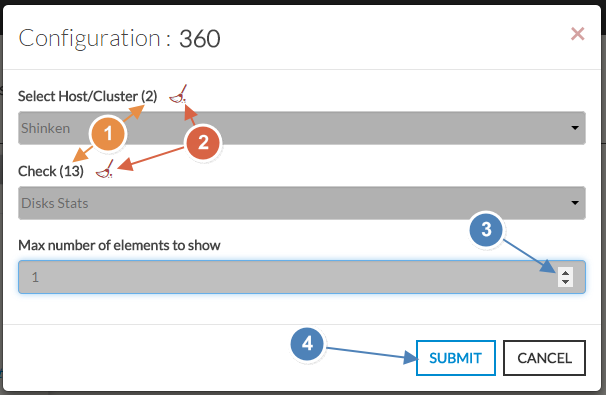
- Select a host or cluster name in the first list.
- The total number of hosts and clusters will be displayed near "Select Host/Cluster" (1).
- If no host selected yet, the list of available hosts will automatically opened.
- You can search (filter) for a host name, typing into the input on top of the list.
- You can clean the current selection by clicking on the swipe icon (2).
- Once your element is selected, if you want to monitor a specific check, you just have to select check name inside the second list.
- You can set the maximum number of elements displayed in the list (3).
- When configured, press the SUBMIT button (4).
|  |
Add Comment