Principe | |
Les contacts sont utilisés de 2 façons | |
Overview | |
Contacts are used in two ways :
Dans In Shinken Enterprise, a contact is a web interface user. Rights of a user depend on objects he is contact for. A contact affected to no host neither checks, will be able to authenticate in the web interface, but will not be able to see monitoring objects. Like other objects, contacts can hinerit from templates, and can be arranged in groups. | |
Access to the Contacts Configuration | |
un contact est utilisateur de l'interface web Ses droits dépendant de l'objet auquel il est rattaché. Un contact sans rattachement pourra se connecter, mais ne verra aucun objet supervisé . Les contacts peuvent hériter de templates, et être organisée en groupes | |
Accéder àa la configuratyion des contacts | |
Page accessible depuis le menu principal "Eléments". Un sous-menu apparaît avec 5 catégories Contacts Configuration can be accessed by the Main Menu "Elements". When pointing cursor over Contacts in the Main Menu, a sub menu appears, showing 5 categories :
Select one of the sub categories to get into Configuration. Selecting Contacts in the Main Menu, is the same as selecting Contacts in the Sub Menu. 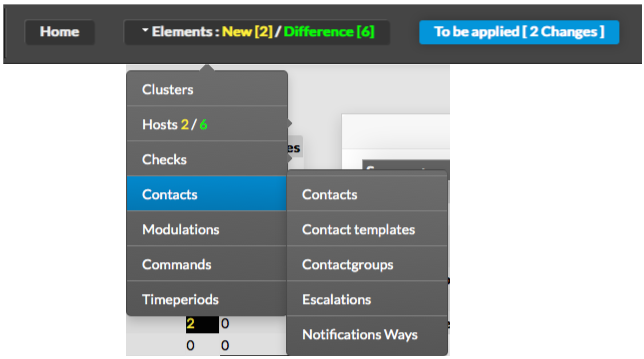
| |
Page History
Overview
Content Tools
Tasks