Versions Compared

Key

  • This line was added.
  • This line was removed.
  • Formatting was changed.

...

Every page for elements configuration are organized in the same way.
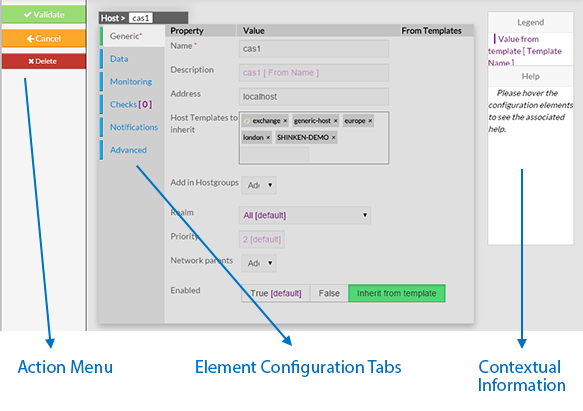


The Layout is divided in 3 sections :

  • Action Menu.
  • Element Configuration Tabs
    • It

...

    • contains all information of an element.
  • Contextual information and Help.

...

Action Menu

This Menu provides to the Administrator the common actions to Validate, Cancel, or Delete the selected object.

    • When validating a configuration, the object will be placed in the list of Changes to Apply.

    • If the Administrator click on the Cancel button, every changes made after previous saving, will be lost.

    • If the Delete button is clicked, a confirmation popup will be disaplayed, asking the Administrator to validate or cancel the deletion of object.

...