...
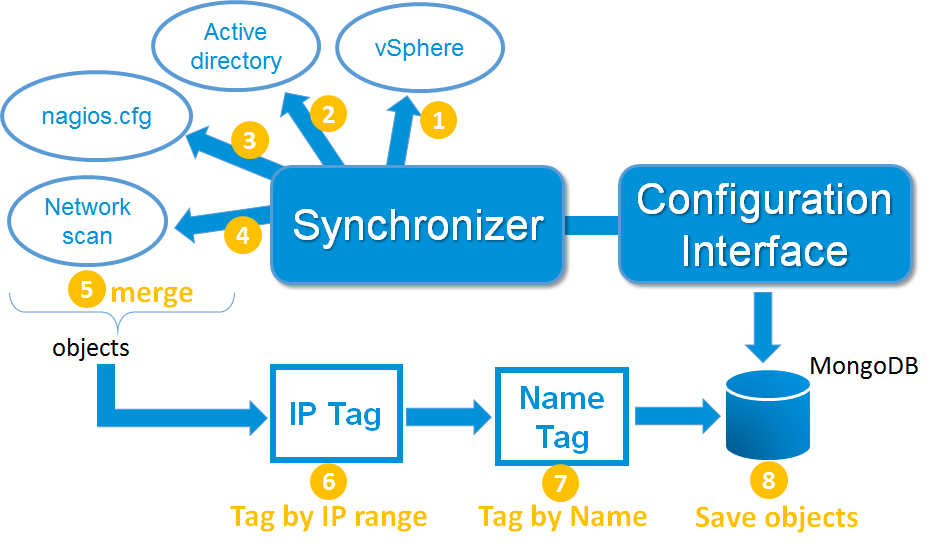
- Active directory
- VSphere (VMWare)
- Nagios or Shinken framework configuration files
- Network scans
Active directory
The Active Directory discovery is done with a domain account, and only need a read access. The connexion can be done in LDAPS to be sure the connexion is secure.
...
The information that the module is getting are server names, FQDN, the server OS, and if defined in the LDAP entry, its localization. The configuration for this source is located in another page.
VSphere from VMWare
The VSphere discovery is designed to discover physical servers (ESX) and their virtual servers. It will also get OS and their IP address, but only if the VMware tools are enabled and running on the virtual server.
...
The Shinken Enterprise to VSphere communication is done with the SOAP API from VMWare, onto an HTTPS connexion. The configuration for this source is located in another page.
Nagios or Shinken Framework configuration files
Shinken Enterprise is able to load any Nagios or Shinken Framework configuration files. It will automatically load the defined objects into its configuration. The configuration for this source is located in another page.
Network scans
The network scan discovery is optional. It's done thanks to the nmap command, launched on the Synchronizer server. It allows to scan networks defined by the Shinken Enterprise administrators.
The scans are done on the TCP and UDP ports. It will also try to get additionnal data from the servers and services running on them (it use the -O option of the nmap command). The configuration for this source is located in another page.
Data storage of the configuration
All discovered data from the Synchronizer are saved into a Mongodb database. If possible, it's better for the database to be set aside the Synchronizer daemon. this database do not need to be shared with other daemons, and so its communications should be limited to the local synchronizer server.
...