Main Menuprincipal | |
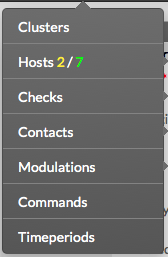
En haut de la page, vous avez accès au menu principal. Celui-ci est toujours visible. 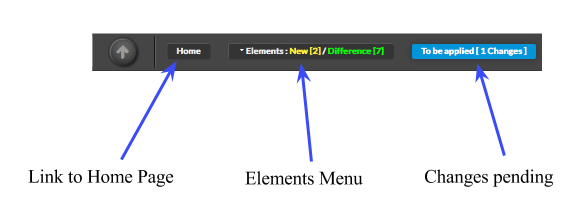 Comme visible sur cette image, ce menu vous donne accès aux sections suivantes At the top of the page, you can see the Main Menu. This Menu is always available. As shown on the image, this menu let you access to main configuration sections :
| |
Elements Menuéléments | |
Le menu éléments donne un accès facile à chaque élément de la configuration utilisé pour construire le système de supervision . Ce menu donne accès aux éléments suivants Elements Menu give the Administrator an easy access to each elements of the configuration that are used to build and maintain the monitoring system. This menu provides the following access :
The menu also provides information about changes, showing the Administrator how many and what type of changes have been detected. New elements appears in YELLOW, and changes appears in GREEN.
Ce menu propose également des informations au sujet des changements, permettant de voir combien et quel type de changement ont été détectés . Les nouveaux éléments apparaissent en JAUNE, et les changements apparaissent en VERT.
Dans cet exemple, on peut voir 2 nouveaux hôtes et 7 changements détéctésIn the example, we can see 2 new hosts and 7 changes detected. |
|
Logout | |
| You can logout from the current session by using the button located at top rightVous pouvez vous délogger de la session en cours ne utilisant le bouton en haut à droite. |  |