...
Principe
The HUD contains the essentials for the element, splitted in two zones : Identification and State SummaryLa HUD contient les éléments principaux d'un élément, divisé en 2 parties : Identification et synthèse.
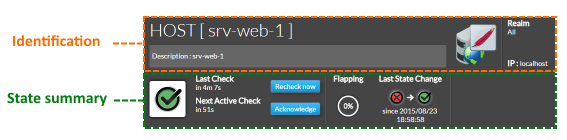
Identification
- Element type Type d'élément : Host or ou Cluster
- Element Name
- Element description
- Nom de l'élément
- Description de l'élément
- Icone de l'élément
- cette icone est déterminée par le 1er template visible dans la synthèse .
Dans cet exemple de Element icon
- The icon is determined by the first host template that is displayed in the summary tab.
In our srv-web-1 the icone displayed is the apache one because the first template is the apache host template. 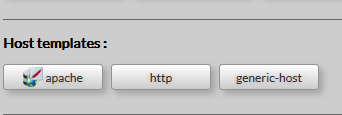 Image Removed Image Removed
If there is no template attached to your host, or if the attached template has no defined icon, so the icon displayed will be the default one.
- The realm to which the element belongs
- Address of the element.
- A button to refresh host detail view
- All data displayed brought back again from the Shinken Enterprise Backend.
|  Image Removed Image Removed |
State Summary
This zone will provide the status, details on this status, and some of the command to manage the status of the chosen element.
l'icone qui apparaît est celle d'apache car il s'agiut du 1er template visible dans l'onglet "templates d'hôtes" . Image Added - Le royaume auquel est rattaché l'élément
- l'adresse de l'élément.
- Un bouton pour rafraîchir la vue détail
- toutes les données seront alors mises à jour depuis le serveur Shinken Enterprise .
| Image Added |
Synthèse de l'état
Cette zone présente le statut, les détails du statut et certaines commandes permettant de gérer l'hôte .
- statut de l'élément (comme dans le widget statut sur le portail)
- temps écoulé depuis le denier check et temps restant jusqu'au prochain .
- Bouton pour lancer instantanément un check
- bouton pour ouvrir une fenêtre de dialogue permettant de mettre en mode "prise en compte" .
La prise en compte confirme que quelqu'un a été averti du statut et nécessite la saisie d'un commentaire .
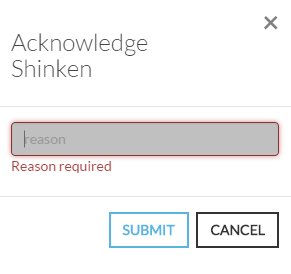 Image Added Image Added - Une jauge informe si l'élément est en mode "flapping" et de combien
- La dernière zone à droite informe de la dernière modification du statut de l'élément, quand il a changé, ainsi que son état précédent .
|  Image Added Image Added |
| Information au sujet du terme HUD : HUD (Head Up Display- affichage tête haute) est un terme utilisé en aéronautique et permet d'accéder aux informations essentielles en un coup d’œil | Current element status (like status widget with context)The time elapsed from the last check and when the scheduled check will occur.Click this button to launch an instant checkClick this button to open a modal form to acknowledge the current status of the host.
The acknowledgement informs that the current status has been seen by somebody, this is why a reason in form is required.
Image RemovedA gauge informs if the element is flapping and howThe last zone on the right, informs the user when the state changed.
It precises the previous and the new status and the exact date and time.Image Removed | Info about HUD name: HUD (Head Up Display) is a transparent display used in fighter plane. The HUD gives the essential info in the sight line of the pilot . |
|---|