Qu'est-ce que le health check
Cet outil est utilisé pour vérifier :
- L'état de l'installation de Shinken Enterprise, (version des démons).
- L'état des principales options de configuration réseau (ports, adresses).
- L'état des modules et sous-modules activés.
- L'état des connexions réseau et la synchronisation d'horloge entre les démons.
Si il est lancé sur l'arbiter, il vérifiera tous les démons de l'architecture. Une option permet de ne vérifier que les option locaux.
Si il est lancé sur un serveur distant (scheduler, poller, etc...) seul le démon local sera vérifié.
Il s'agit d'un outil de diagnostic général qui peut détecter les problèmes les plus importants mais ne fournit pas autant d'information et de détail que les checks fournis par Shinken pour son propre monitoring, qui donnent par exemple des indicateurs de performance.
Usage:
| Code Block | ||
|---|---|---|
| ||
shinken-healthcheck |
Principales options:
| Option | Description |
|---|---|
--version | Montre le numéro de version de Shinken |
shinken-healthcheck
This tool is used to check the state of your Shinken Enterprise installation and configuration.
If launch on the arbiter daemon, will check all the daemons of your architecture (simulate shinken-global-healthcheck)
If launch from a distant server (scheduler, poller, etc...) only the local daemons will be check (simulate shinken-local-healthcheck)
Usage:
shinken-healthcheckOptions:
| Name | Description |
|---|---|
--version | Show program's version number and exit. |
-h, --help | Show this help message and exit. |
-w, --write-output | Write output that can be send to the Shinken Solutions team. |
Sample Output
| Code Block | ||
|---|---|---|
| ||
########################################
This tool is used to check the state of your Shinken Enterprise (2.03.02) installation and configuration
########################################
[ ....................................................................................................  ] 100%
Architecture
    OK:         [/etc/shinken/synchronizers/synchronizer-master.cfg:13] connection to daemon is
                OK
    OK:         [/etc/shinken/schedulers/scheduler-master.cfg:14] connection to daemon is OK
    OK:         [/etc/shinken/brokers/broker-master.cfg:15] connection to daemon is OK
    OK:         [/etc/shinken/receivers/receiver-master.cfg:7] connection to daemon is OK
    OK:         [/etc/shinken/reactionners/reactionner-master.cfg:9] connection to daemon is OK
    OK:         [/etc/shinken/pollers/poller-master.cfg:9] connection to daemon is OK
    OK:         [/etc/shinken/arbiters/arbiter-master.cfg:13] connection to daemon is OK
    AT RISK:    [/etc/shinken/synchronizers/synchronizer-master.cfg:13] is defined with
                localhost address, will be a problem in distributed mode. Please configure it
                with the LAN IP/FQDN address instead
    AT RISK:    [/etc/shinken/schedulers/scheduler-master.cfg:14] is defined with localhost
                address, will be a problem in distributed mode. Please configure it with the LAN
                IP/FQDN address instead
    AT RISK:    [/etc/shinken/brokers/broker-master.cfg:15] is defined with localhost address,
                will be a problem in distributed mode. Please configure it with the LAN IP/FQDN
                address instead
    AT RISK:    [/etc/shinken/receivers/receiver-master.cfg:7] is defined with localhost
                address, will be a problem in distributed mode. Please configure it with the LAN
                IP/FQDN address instead
    AT RISK:    [/etc/shinken/reactionners/reactionner-master.cfg:9] is defined with localhost
                address, will be a problem in distributed mode. Please configure it with the LAN
                IP/FQDN address instead
    AT RISK:    [/etc/shinken/pollers/poller-master.cfg:9] is defined with localhost address,
                will be a problem in distributed mode. Please configure it with the LAN IP/FQDN
                address instead
    AT RISK:    [/etc/shinken/arbiters/arbiter-master.cfg:13] is defined with localhost address,
                will be a problem in distributed mode. Please configure it with the LAN IP/FQDN
                address instead
Libs
    OK:         [lib check] pymongo is is available
    OK:         [lib check] pycurl is is available
    OK:         [lib check] gevent is is available
    OK:         [lib check] ldap is is available
    OK:         [lib check] gevent is is available
Licence key
    ERROR:      The licence key is invalid
    ERROR:      The key format is invalid.
    ERROR:      No licence key.
    ERROR:      The licence key is expired
Modules
    OK:         [Synchronizer] auth_secret is a custom variable
    OK:         [Synchronizer] master_key is a custom variable
    OK:         [WebUI] auth_secret is a custom variable
Storage
    OK:         [Synchronizer] mongodb server is available: mongodb://localhost/?safe=false
    OK:         [graphite] server localhost:2003 is available
    OK:         [webui::mongodb module /etc/shinken/modules/mongodb.cfg:5] mongodb server is
                available: mongodb://localhost/?safe=true
    OK:         [webui::graphite] server 127.0.0.1 is available with 10 top level elements
|
Output parts
The healthcheck output is separated into several parts:
- Architecture: about your daemons configuration
- Libs: about installed librairies need by Shinken Enterprise
- Licence key: all about your licence key
- Modules: information about UIs
- Storage: information about the mongodb and graphite storage system
There are 3 level for output:
- OK: all is valid
- At Risk: it works, but something can go wrong in the future if you don't fix something
- Error: this part is in error and must be fix now
shinken-local-healthcheck
This tool is used to check the state of your local Shinken Enterprise installation and configuration.
With this command, only the local installation and daemons will be checked.
Usage:
shinken-local-healthcheckOptions:
...
--version...
| . |
-h, --help |
...
| Montre les différentes options acceptées par la commande. |
- |
...
f, -- |
...
Output parts
The healthcheck output is separated into several parts:
...
file | Écrit la sortie de la commande dans un fichier, par exemple dans le but d'un envoi à l'équipe Shinken Solution. |
Données de sortie
La sortie de la commande est constituée de plusieurs parties:
- Architecture: au sujet de la configuration des démons
- Libs: au sujet des librairies installées et nécessaires à
...
- Shinken Enterprise
- Licence key:
...
- au sujet de votre clé de licence
- Modules:au sujet des Interfaces Utilisateurs
- Storage: au sujet du stockage dans mongodb et dans graphite
Il y a 3 niveaux en sortie:
- OK: tout va bien
- AT RISK: Problème pouvant potentiellement nuire au fonctionnement du système.
- ERROR: Une erreur bloquante a été détectée.
Exemple d'informations envoyées
Voici un extrait de vérification pour un démon :
| Panel |
|---|
|
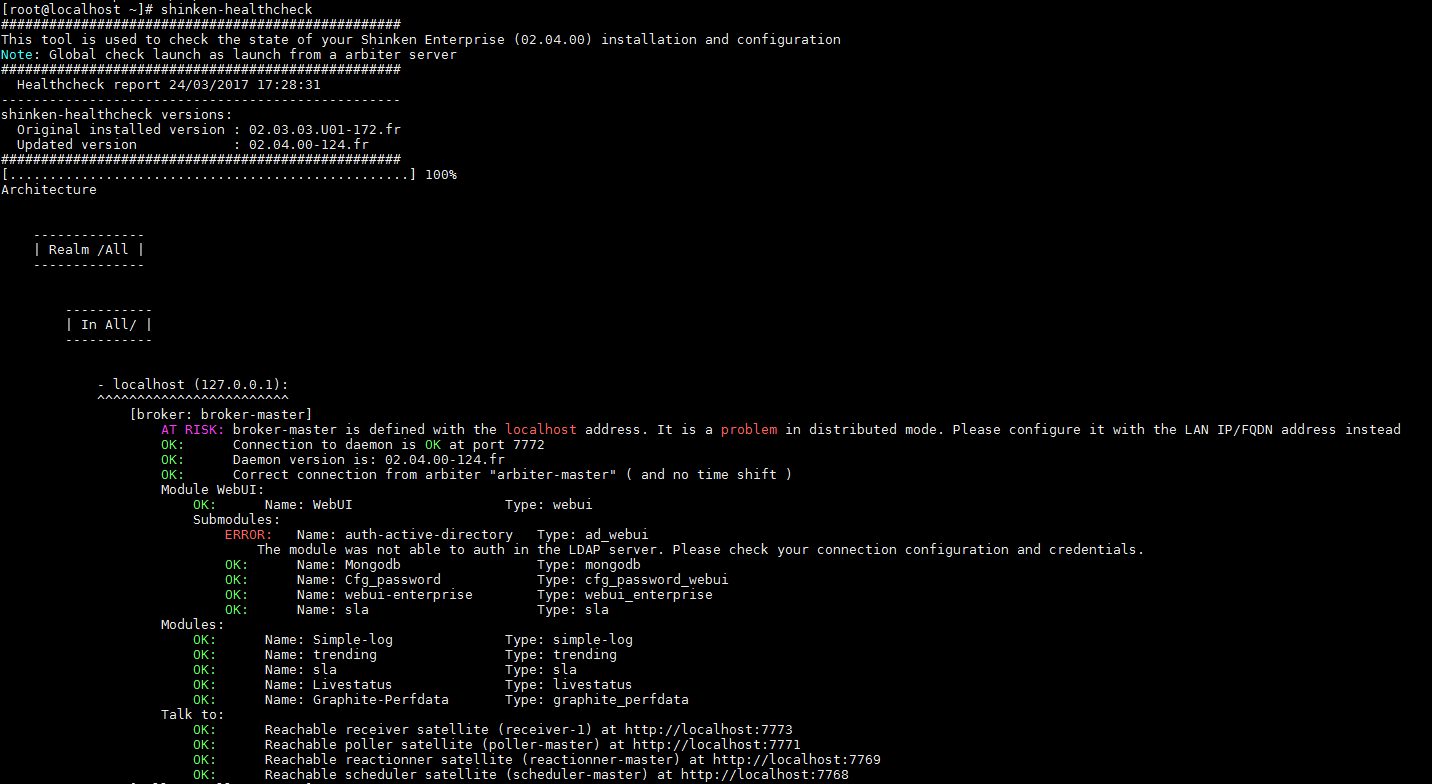
On peut voir ici deux problèmes :
- Le broker ici configuré est en adresse "localhost". C'est cette adresse qui est distribué aux démons pour contacter le broker, ce qui signifie qu'avec cette adresse, aucun démon distant ne pourra contacter ce broker
- Un sous-module, ici l'authentification active-directory, est en erreur
- Par ailleurs le démon est dans la bonne version, contacte correctement les autres satellites, et n'a pas de décalage temporel avec l'arbiter.
There are 3 level for output:
- OK: all is valid
- At Risk: it works, but something can go wrong in the future if you don't fix something
- Error: this part is in error and must be fix now
shinken-global-healthcheck
This tool is used to check the state of your local Shinken Enterprise installation and configuration.
With this command, all the local and distant daemons will be checked. This should be launched only for the central (synchronizer/arbiter) daemon.
Usage:
shinken-global-healthcheckOptions:
| Name | Description |
|---|---|
--version | Show program's version number and exit. |
-h, --help | Show this help message and exit. |
-w, --write-output | Write output that can be send to the Shinken Solutions team. |
Output parts
The healthcheck output is separated into several parts:
- Architecture: about your daemons configuration
- Libs: about installed librairies need by Shinken Enterprise
- Licence key: all about your licence key
- Modules: information about UIs, if launch on a broker daemon
- Storage: information about the mongodb and graphite storage system, if need by daemons
There are 3 level for output:
...