Description
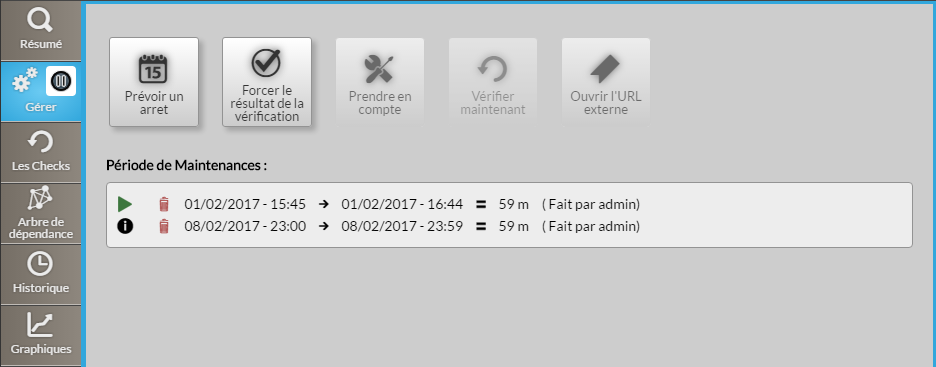
Cet onglet présente la liste des actions possible à réaliser sur cet élément (hôte ou cluster).
| Warning |
|---|
Remarque: Un message d'erreur apparaît en haut de la page lorsqu'il y a un écart horaire de plus de 30 secondes entre le serveur et le navigateur de l'utilisateur. La visualisation de cette information d'écart de temps, vous évitera de planifier de mauvaises périodes de maintenance. |
Utilisation
Boutons d'action:
Définir une période d'arrêt:
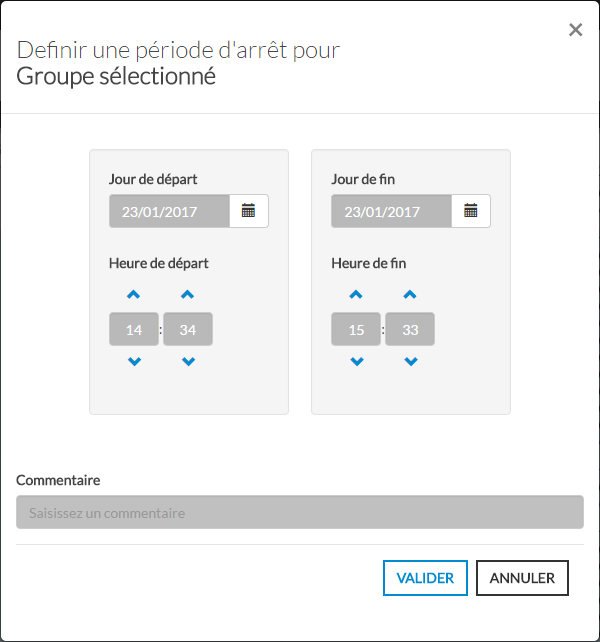
Définir une période d'arrêt permet de prévenir les autres utilisateurs de la planification d'une période de maintenance de l'élément (hôte ou cluster).
(1) Cliquez sur le bouton "Prévoir un arrêt" pour ouvrir la fenêtre.
(2) Saisissez la date de début et de fin de période
(3) Ajoutez un commentaire visible par tous. (recommandé, mais pas obligatoire.)
Info Pendant la période de maintenant l'élément passe en contexte "downtime". (voir Statut & Contexte)
Forcer le résultat à un statut:
Forcer le résultat à un statut jusqu'à la prochaine vérification.
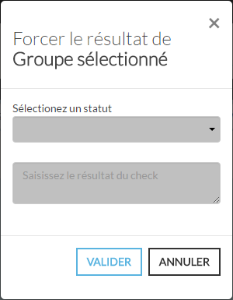
(1) Cliquez sur le bouton "Forcer le résultat de la vérification" pour ouvrir la fenêtre.
(2) Sélectionnez le statut ( voir Statut & Contexte )
(3) Saisissez le résultat du check.
Info Note: Dès saisie, le statut est mis à jour et proposé dans l'onglet Onglet Synthèse. Le nouveau statut ne sera valable que jusqu'à la prochaine vérification.
Prise en compte d'un élément:
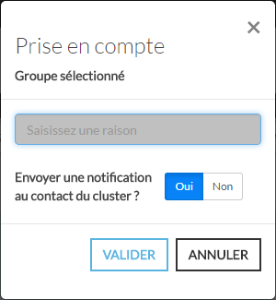
La prise en compte d'un élément permet de prévenir les autres utilisateur que l'élément est en cours de réparation. Il est également possible de notifier directement le contact de l'élément. (Par défaut: Oui)
(1) Cliquez sur le bouton "Prendre en compte" pour ouvrir la fenêtre.
(2) Saisissez une raison de la prise en compte.
(3) Choisissiez si oui ou non vous souhaitez notifier le contact de l'élément.
Info Le contexte d'un élément passe en "Acknowledge" pendant toute la durée de la prise en compte. (voir Statut & Contexte)
Supprimer la prise en compte:
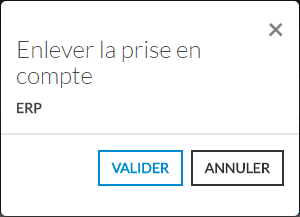
Ce bouton permet d'annuler la prise en compte de l'élément.
Cliquez sur le bouton "Enlever la prise en compte" pour remettre l'élément dans son état précédent.
Info Remarque: Ce bouton est visible uniquement si l'élément est en prise en compte.
Vérifier à nouveau le statut:
Ce bouton permet de vérifier le statut de l'élément sans attendre la prochaine vérification.
- Cliquez sur le bouton "Vérifier maintenant" pour forcer la vérification.
Ouvrir une url de note:
Ce bouton permet d'ouvrir un lien défini au préalable dans la configuration.
- Cliquez sur le bouton "Ouvrir une url externe" pour ouvrir l'url défini dans un nouvel onglet.
Période de maintenance:
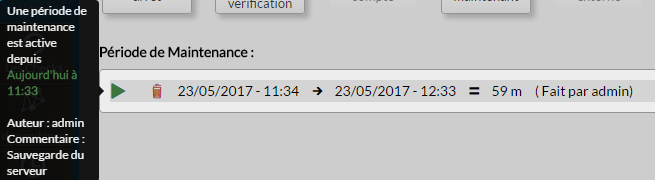
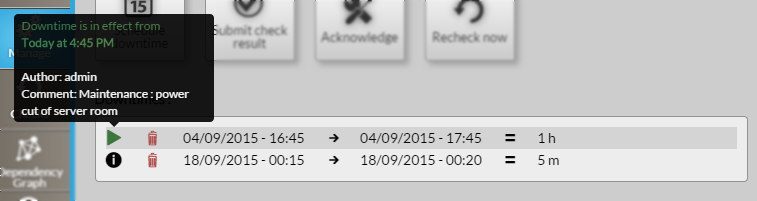
Cette zone liste l'ensemble des maintenances planifiées de l'élément (hôte ou cluster).
Chaque ligne correspond à une période de maintenance est indique:
heure et date de début → heure et date de fin = durée totale
La première icône  permet de connaître l'auteur et les commentaires saisis.
Si une maintenance est en cours:
- Cette icône est remplacée par l'icône
 .
. - Le contexte de l'élément est modifié et le statut passe à "sous maintenance" (voir Statut & Contexte).

- Cette icône
Si aucune maintenance n'est planifiée:
- La liste des maintenances est vide (comme sur l'image ci-contre).
Supprimer la période de maintenance:
Cliquez sur la corbeille dans la ligne correspondante pour supprimer la maintenance.
Warning Attention aucun message de confirmation ne vous sera demandé.

Overview
The manage tab is splitted in 2 rows :
...
| Warning |
|---|
Note: An error could be displayed on the top of this tab if the backend server has a gap Having a difference between your computer and the server will prevent you to schedule |
...
Action buttons
Schedule Downtime button
...
It opens a pop-up with two calendars and two selectors for hours.
You have to define the Start and the End of the downtime period.
Even if not mandatory, we advise you to add a comment as it will be
very usefull for anybody looking at the list of planned downtime.
The purpose of the downtime will be displayed in the list of downtime.
...
Submit check result button
...
- This button opens a modal form to force the status of the element
Note: On submit, the element status will be updated with your selection and
the new output will be displayed in the Summary tab.
The new "forced" status will only be valid until the next check.
...
Acknowledge
...
- This button opens a modal form to acknowledge the current status of the host.
- The acknowledgement informs that the issue (Critical, Warning, Unknown) has been taken
into account by a user.- A text describing the reason is required to submit the acknowledge.
- The context of the Element will change to Acknowledge ( See Status & Context )
...
Remove Acknowledge
...
- This button opens a modal form to remove the current Acknowledge context
set on the element.
...
Recheck Now
- This button force a check request to the Shinken Enterprise Backend for the host status.
...
Downtimes scheduled
...
If there is no downtime defined for the host
the list of downtime is empty (like the first image in 'overview').

...
...
...