Description
This widget displays the dependency tree of a host or a cluster.
- A 2D tree starting from the chosen element (host or check), displays dependency links:
- A Node will be the representation of either a host, a cluster or a check.
- Each element has 4 components:
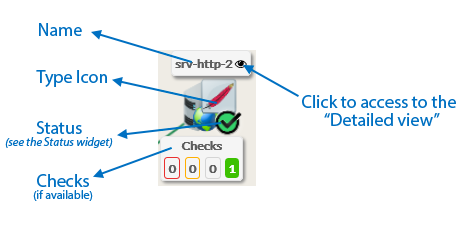
| - Its name.
- Its icon representing its type.
- Its status (icon state => see the Status & Context for the list).
- If the elements is a host, available Checks will be displayed in 4 boxes below sorted by their status (Critical, Warning, Unknow, Ok).
- You can access the “Detailed view” of this element by clicking on the eye icon.
| | | |
| 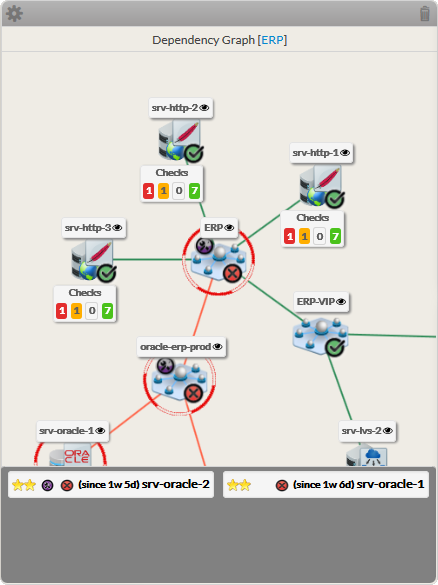 |
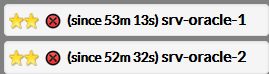
- If, in the dependency graph, some elements are not in “OK” state, they will be listed in at the bottom of the graph.
|  |
Usage
You can navigate in the tree to see the dependencies.
Shift the tree- Maintain the left or right mouse button pressed to shift the tree in the 4 directions.
| |
Center the tree on not OK elements displayed in the bottom list- Click on the element name to center on this element.
| |
Re-Center on the chosen element- To come back to the monitored element, press on the reload button.
| |
Open the detailed view of a specific node | |
- You can access the “Detailed view” of this element by clicking on the eye icon, near to the name of the node.
Configuration
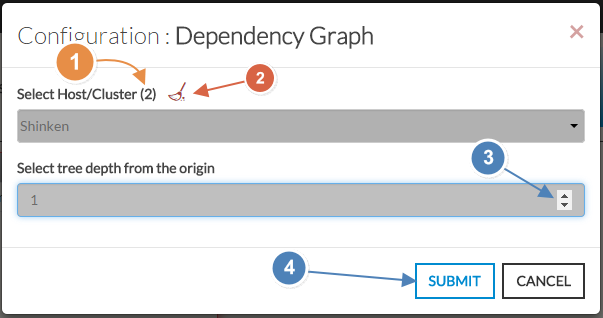
- Sélectionner un hôte ou un nom de cluster dans la liste.
- Le nombre total d'hôtes et de clusters apparaîtra près de "Sélectionner Hôte/Cluster" (1).
- si aucun n'est déjà sélectionné, la liste de tous les hôtes disponibles apparaîtra automatiquement
- Vous pouvez faire un filtre sur un nom ou un type en saisisant directement dans la liste (3).
- Vous pouvez nettoyer la sélection en clickant sur le balai (2)
- Depth of the tree.
- By default, the depth is set to 5, but you can change it as you want (3) between 1 to 10.
- When configured, press the SUBMIT button (4).
| 
|