Overview
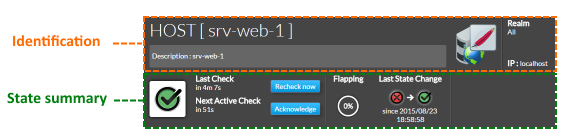
The HUD contains the essentials for the element, splitted in two zones : Identification and State Summary.
Identification
- Element type : Host or Cluster
- Element Name
- Element description
- Element icon
- The icon is determined by the first host template that is displayed in the summary tab.
In our srv-web-1 the icone displayed is the apache one because the first template is the apache host template.
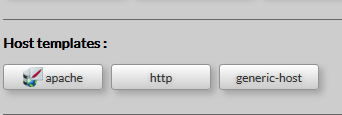
- If there is no template attached to your host, or if the attached template has no defined icon, so the icon displayed will be the default one.
- The realm to which the element belongs
- Address of the element.
- A button to refresh host detail view
- All data displayed brought back again from the Shinken Enterprise Backend.

State Summary
This zone will provide the status, details on this status, and some of the command to manage the status of the chosen element.
|
Info about HUD name: HUD (Head Up Display) is a transparent display used in fighter plane. The HUD gives the essential info in the sight line of the pilot.
