Introduction
Shinken Enterprise relies on external programs (called check plugins) to monitor a very wide variety of devices, applications and networked services.
What Are Plugins?
Plugins are compiled executables or scripts (Perl scripts, shell scripts, etc.) that can be run from a command line to check the status of a host or check. Shinken Enterprise uses the results from plugins to determine the current status of hosts and checks on your network and obtain performance data about the monitored service.
Shinken Enterprise will execute a plugin whenever there is a need to check the status of a service or host. The plugin does something (notice the very general term) to perform the check and then simply returns the results to Shinken Enterprise . It will process the results that it receives from the plugin and take any necessary actions (running event handlers, sending out notifications, etc).
Plugins As An Abstraction Layer
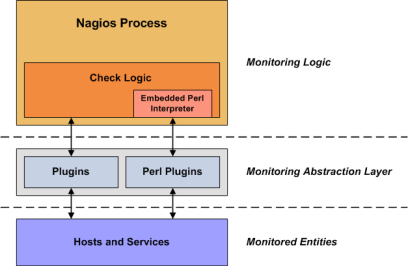
Plugins act as an abstraction layer between the monitoring logic present in the Shinken Enterprise daemon and the actual services and hosts that are being monitored.
The value of this type of plugin architecture is that you can monitor just about anything you can think of.
If you can automate the process of checking something, you can monitor it with Shinken Enterprise .
There are already literally thousands of plugins that have been created in order to monitor basic resources such as processor load, disk usage, ping rates, etc.
If you want to monitor something else, take a look at the documentation on Plugins API and roll your own. It's simple!
You could be monitoring network traffic statistics, data error rates, room temperate, CPU voltage, fan speed, processor load, disk space.
What Plugins Are Available?
There are plugins to monitor many different kinds of devices and services.
They use basic monitoring protocols including: WMI, SNMP, SSH, TCP, UDP, ICMP, LDAP and more
They can monitor pretty much anything:
- Unix/Linux, Windows
- Routers, Switches
- Network services: "HTTP", "POP3", "IMAP", "FTP", "SSH", "DHCP"
- CPU Load, Disk Usage, Memory Usage, Current Users
- Applications, databases, logs and more.
Obtaining Plugins
Shinken Enterprise are delivered with numerous plugins.
You can obtain new one from various website in the Nagios community world, and especially theses ones:
- Monitoring Plugins Project: https://www.monitoring-plugins.org
- Nagios plugin exchange: https://exchange.nagios.org/
How Do I Use Plugin X?
Most plugins will display basic usage information when you execute them using "-h" or "--help" on the command line.
For example, if you want to know how the check_http plugin works or what options it accepts, you should try executing the following command:
./check_http --help
Plugin API
Plugin Overview
Scripts and executables must do two things (at least) in order to work as Shinken Enterprise plugins:
- Exit with one of several possible return values (Return Code)
- Return at least one line of text output to "STDOUT" ( Plugin Output )
The inner workings of your plugin are not important to Shinken Enterprise , interface between them is important.
Your plugin could check the status of a TCP port, run a database query, check disk free space, or do whatever else it needs to check something.
The details will depend on what needs to be checked - that's up to you.
Return Code
Shinken Enterprise determines the status of a host or service by evaluating the return code from plugins.
The following tables shows a list of valid return codes, along with their corresponding service or host states.
| Plugin Return Code | Service State | Host State |
|---|---|---|
| 0 | OK | UP |
| 1 | WARNING | DOWN |
| 2 | CRITICAL | DOWN |
| 3 | UNKNOWN | DOWN |
Plugin Output Spec
At least, plugins should return one of text output. Plugins may also return optional performance data that can be processed by the metrology modules.
The basic format for plugin output is shown below:
TEXT OUTPUT | OPTIONAL PERFDATA
The performance data is optional.
If a plugin returns performance data in its output, it must separate the performance data from the other text output using a pipe (|) symbol.
Plugin Output Examples
Let's see some examples of possible plugin output...
Case 1: One line of output (text only)
Assume we have a plugin that returns one line of output that looks like this:
DISK OK - free space: /var 3326 MB (56%);
If this plugin was used to perform a service check, the entire line of output will be stored in the $SERVICEOUTPUT$ data.
Case 2: One line of output (text and perfdata)
A plugin can return optional performance data for use by external applications. To do this, the performance data must be separated from the text output with a pipe (|) symbol like such:
DISK OK - used space: /var 3326 MB (56%); | /var=3326
If this plugin was used to perform a service check, the portion of output (left of the pipe separator) will be stored in the <$SERVICEOUTPUT$> data and the portion of output (right of the pipe separator) will be stored in the $SERVICEPERFDATA$ data.
A perfdata is composed at a minimum of:
key=value
For example:
/var=3326
Then in option you can have more information:
key=valueUNIT;warning;critical;minimumvalue;maximalvalue
For example:
/var=3326MB;5948;5958;0;5968
You can have as mush perfdata as you want, just by separating values with space:
HTTP OK: HTTP/1.1 200 OK - 20156 bytes in 0.271 second response time |time=0.270634s;;;0.000000 size=20156B;;;0
Plugin Output Length Restrictions
Shinken Enterprise will only read the first 64 KB of data that a plugin returns. This is done in order to prevent runaway plugins from dumping megs or gigs of data back to Shinken Enterprise .