Principe | |||||
Les commandes sont des éléments de configuration permettant de décrire l'utilisation d'un plugin . Elle précise ou trouver le plugin, comment l'utiliser avec les bons arguments et comment remplacer ces arguments par des données Par exemple, check_ping est un plugin utiliser pour pinguer un hôte et collecter ses données de connexion | |||||
Overview | |||||
Commands are configuration elements used to describe plugins usage. It tells Shinken Enterprise where to find plugins, how to use it, what arguments are necessary, and how to substitute arguments by Data. For example, check_ping is a plugin used to ping a host, and get informations about network connectivity with host : | |||||
Plugin help tells that to use the command, we need to pass, as argument the following L'aide du plugin nous précise quels arguments passer pour utiliser la commande ::
The corresponding commands should be La commande correspondante devrait alors être :
In this wayDe cette façon, Shinken Enterprise will able to replace arguments by the corresponding value, depending of HOSTADDRESS and arguments given to command.pourra remplacer les arguments par les valeurs correspondantes en fonction de HOSTADDRESS (adresse de l'hôte) et des arguments fournis dans la commande | |||||
Accessing Commands configuration | |||||
Accéder à la configuration des commandes | |||||
L'accès se fait par l'onglet "Commandes" dans le menu principal | 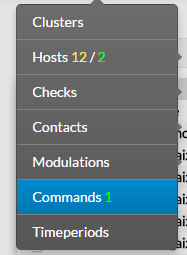 | ||||
En accédant à la page de configuration, une liste apparaît précisant tous les objets commandes . En haut de la table,un barre d'outils permet de :
| | When accessing the Commands Configuration Page, a Command Table is displayed, listing all Commands objects. On the top of the table, A tool bar let Administrators the ability to :
| |||
 | |||||
Cette table contient les informations suivantes:
This table contains the following informations :
This page also provides, on the left, an action Menu, used to : Cette page propose également à gauche un menu action permettant de :
| |||||
Create a new Command | |||||
Créer une nouvelle commande | |||||
Pour créer une nouvelle commande,,utiliser le bouton To create a new Command, use the button "Add new [Command]" located in the Action Menusitué dans le menu d'action | 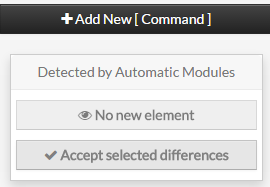 | ||||
Command creation form will be displayed. This form is composed of tabs, corresponding to categories of properties :
| |||||
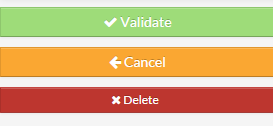
The left menu give to Administrators the ability to :
|  | ||||
Le formulaire de création apparaît Ce formulaire est composé d'onglet correspondant à des catégories de propriétés :
| |||||
Le menu de gauche permet de :
| | ||||
| Pour chaque catégorie, un formulaire correspondant apparaît For each category, a corresponding form is displayed. | |||||
Generic | |||||
Générique | |||||
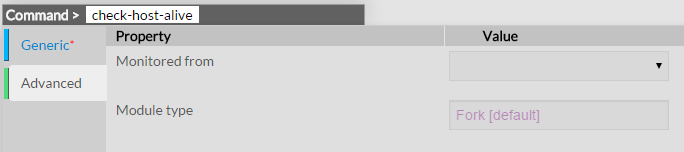
Les propriétés génériques contiennent les propriétés minimum réclamées pour créer une commande :
Generic properties contains the minimum properties requiered to create a Command :
|  | ||||
Advanced | |||||
Avancé | |||||
Les propriétés avancées permettent de définir :
Advanced properties are used to define Advanced features like :
|  | ||||
Modify a command | |||||
Modifier une commande | |||||
Pour modifier les propriétés d'une commande, accéder à la page "Commande" depuis le menu principale puis cliquer sur le nom de la commande que vous souhaitez modifier To modify properties of a command, first go on the Commands page, from the Main menu, then click on the command name you want to modify. |
| ||||
The form displayed is the same as the form used to create a new Command. All fields are filled with Command properties.
| | ||||
Le formulaire est le même que celui de la création.
| | ||||
Une fois les changements réalisés, il faut sauvegarder. Le bouton supprimer permet de revenir à l'état prcéédent sans prise en compte ds modificationsOnce changes have been made, configuration of the Command must be saved by clicking the Validate button available on the left menu. Cancel button revert all changes to previous configuration. | |||||
Delete a command | |||||
| To delete a command, you can use the form of the command, or delete it directly from the list page. | |||||
From the Form page First go to the Commands page, from the Main menu, then click on the command name you want to delete. Once in the page displaying the form, click on the Delete button available on the left menu. A confirmation popup will be displayed. | | ||||
Supprimer une commande | |||||
| Pour supprimer une commande, vous pouvez utiliser soit le formulaire, soit directement la liste . | |||||
Depuis le formulaire Allez sur la page commande, puis cliquer sur le nom de la commande à supprimer . Cliquer ensuite sur le bouton "supprimer", une fenêtre de confirmation va alors apparaître. | | ||||
Depuis la page principale Allez dans la page commande du menu principal, puis cliquer sur la boîte de choix placée dans la 1ère colonne à gauche. Utilisez le menu Action et sélectionner Supprimer, puis cliquer sur le bouton Lancer. Une fenêtre de confirmation apparaître. Passer par le menu principal permet d'en supprimer plusieurs d'un coup From the Main page First go to the Commands page, from the Main menu, then click on the check box placed on the first column of the table. Use the Action menu on the top to select Delete, and click to the Launch Button. A confirmation popup will be displayed. Using the Main page gives Administrators ability to Delete many Commands at once. | 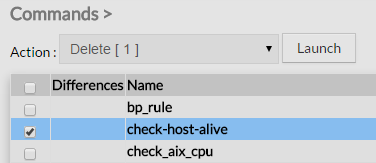 | ||||
Duplicate a command | |||||
| Duplication operation is very useful when similar Commands must be added. | |||||
To duplicate a command, first go on the Main page listing all commands, then select a comand by clicking on the check box placed on the first column. |  | ||||
Once selected, the command can be duplicated by selecting Duplicate in the select Action of the tool bar. Duplication is executed by clicking the Launch button. | 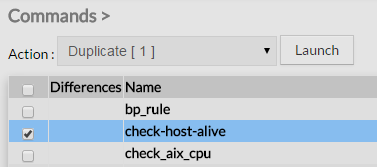 | ||||
Dupliquer une commande | |||||
| La duplication peut être très pratique pour des commandes similaires. | |||||
Allez dans la page commande du menu principal, puis cliquer sur la boîte de choix placée dans la 1ère colonne à gauche. | | ||||
Utilisez le menu Action et sélectionner Dupliquer, puis cliquer sur le bouton Lancer. | | ||||
| Le nom de la nouvelle commande aura le suffixeThe name of command duplicated is suffixed by "(copy)" | 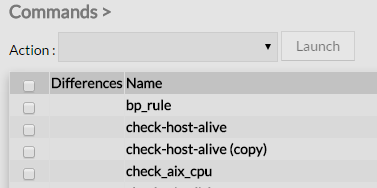 | ||||
Toutes les propriétées et données sont conservées lors de l aduplication.
Using the Main page gives Administrators ability to Duplicate many Commands at once. All properties are kept when duplicating operation, as well as data.
| |||||
Page History

Overview
Content Tools
Tasks