Principe |
L'escalade est une option pour envoyer différents niveaux d'alertes en fonction de règles Elle peut s'appliquer sur les hôtes ou les checks. Voir Escalade de notifications pour plus d'informations. Exemple de hiérarchie : |
Overview |
Escalation is an optional feature used to send different level of notifications, according to specific rules. Escalation can apply on Hosts and Checks. See Notification escalations for more informations. This feature is very useful when you want to send notifications to different level of user, fitting the technical hierarchy, when a problem is not resolved immediately : | Time (minutes) | Notification |
|---|
| 0Operational | supportSupport opérationnel | | 60 | Support Manager | | 120 | Technical Manager technique |
| Escalations are available from the Contacts Menu |
| Les escalades sont disponibles dan le menu contacts | 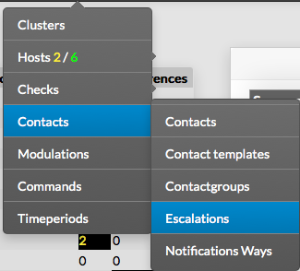 |
The main page of escalations, gives a list of all existing escalations with following details : - a CheckBox used to select on or more escalations
- differences since last commit
- name of the escalation
- Escalation Start, in minutes, when the escalation is effective
- Escalation End, in minutes, when the escalation stops
- Contacts
- Contact Groups
- Status
| |
 Image Removed Image Removed |
La page principale présente les détails suivants: - une Boîte de choix utilisée pour sélectionner une ou plusieurs escalades
- différences depuis le dernier commit
- nom de l'escalade
- Début d'escalade , en minutes
- Fin d'escalade , en minutes,
- Contacts
- Groupes de contacts
- Statuts
| |
| Image Added |
En haut de la table, une barre d'outils permet de : - activer, désactiver, supprimer ou dupliquer les escalades
- Filtrer par nom
On the top of the table, A tool bar let Administrators the ability to : - Enable, Disable, Delete or Duplicate selected escalations
- Filter List by Name
| |
| | |
Add an escalation |
Ajouter une escalade |
| Pour créer une nouvelle escalade, utilisez le bouton "ajouter nouveau To create a new escalation, use the button "Add new [Escalation]" located in the Action Menudans le menu action | |
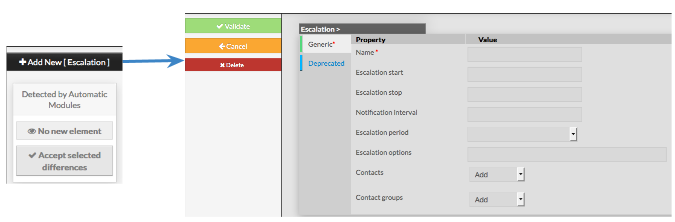 |
The form displayed will is composed of two tabs : - Generic, containing all necessary options
- Deprecated, used for compatibility only, should not be filled
| |
The left menu give to Administrators the ability to : - Validate the new escalation
- Cancel the action
- Delete the escalation
| |
Le formulaire est composé de 2 onglets : - Générique, contient toutes les options nécessaires
- Obsolète, uniquement utilisé pour des questions de compatibilité, ne devrait pas être rempli
| |
Le menu de gauche permet de : - Valider une nouvelle escalade
- annuler l'action
- supprimer l'escalade
| |
La catégorie Générique contient les options suivantes : - Nom
- nom de l'escalade
- champs obligatoire
- Début d'escalade
- l'intervalle représente la durée minimum avant que l'escalade ne soit effective
- la valeur doit être entière en minutes
- Arrêt d'escalade
- l'intervalle représente la durée maximum après laquelle l'escalade n'est plus effective
- la valeur doit être entière en minutes et supérieure à la valeur précédente
- Intervalle de notification
- cette valeur donne la période de récurrence d'envoi de l'escalade
- la valeur doit être entière
- si il n'y a aucune valeur (0) une seule notification sera envoyée
| 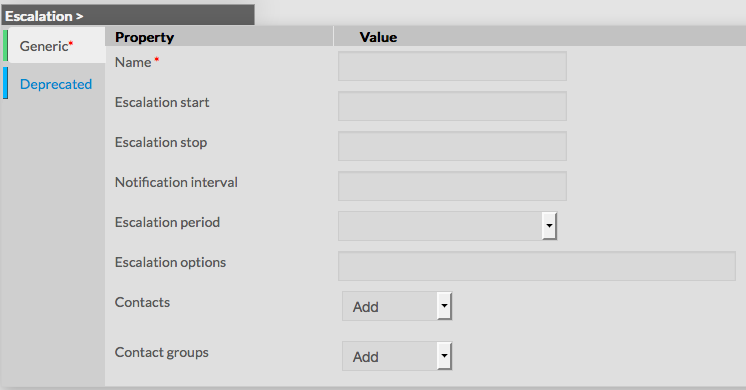 Image Added Image Added |
- Période d'escalade
- cette valeur donne la période d'envoi de l'escalade
- la valeur est sélectionnée dans une liste déroulante
- Options d'escalade
- liste de flags,définissant quels états génèrent une escalade
- la valeur est une liste de flags séparés par une virgule
| Generic category form contains following options :- Name
- the name of the escalation
- this field is required
- Escalation start
- the start interval, represents the minimum duration of time before this escalation is effective
- value must be an integer, representing a number of minutes
- Escalation stop
- the stop interval, represents the maximum duration of time after which notifications for this escalation is effective
- value must be an integer, higher than Escalation start, representing a number of minutes
- Notification interval
- this value tells the recurring period to which escalation will be sent out
- value must be an integer
- if no value is filled, meaning 0, only one notification will be sent
Image Removed | - Escalation period
- this value is used to set on which period notifications should be sent
- the value must be selected from the dropdown, listing all existing timeperiods
- Escalation options
- list of flags, used to determine what state should generate an escalation
- field is a list of comma separated values, valid values are :
- r : send an escalation on RECOVERY state
- d : send an escalation on a DOWN state
- u : send a escalation on UNREACHABLE or UNKNOWN state
- w : send an escalation on a WARNING state
- c : send an escalation on a CRITICAL state
- note : if value is empty, escalation will be sent for any state of host or check
| - Contacts
- list of contacts that should be notified when escalation is effective
- values is a list of contact, available from the dropdown list
- Contact groups
- list of contactgroups that should be notified when escalation is effective
- values is a list of contact groups, available from the dropdown list
|
| Deprecated | |
- liste des contacts à notifier en cas d'escalade
- la valeur est sélectionnée dans une liste déroulante
- Contact groups
- liste des groupes de contacts à notifier en cas d'escalade
- la valeur est sélectionnée dans une liste déroulante
|
| Obsolète | |
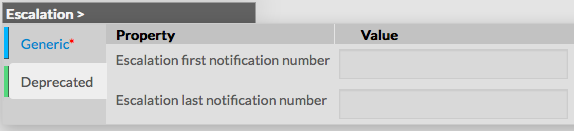
uniquement utilisé pour des questions de compatibilitéThis tab is for compatibility only, it should not be used as those properties will disappear in future versions - Escalation first notification number : replaced by remplacé par Escalation start
- Escalation last notification number : replaced by remplacé par Escalation stop
|  |
| | |
Modify an escalation |
|
Modifier une escalade |
Pour modifier les propriétés d'une escalade : - aller sur la page escalade dans le menu principal
- cliquer sur le nom à modifier
To modify properties of an escalation, first go on the Escalations page, from the Main menu, and then click on the escalation name you want to modify | |
 |
The form displayed is the same as the form used to create a new Escalation.
All fields are filled with Escalation properties. Once changes have been made, configuration of the Escalation must be saved by clicking the Validate button
available on the left menu. Cancel button revert all changes to precedent configuration. | |
| | |
Delete an escalation |
| To delete an escalation, you can use the form of the escalation, or delete it directly from the list page. | |
From the Form page First go to the Escalations page, from the Main menu, then click on the escalation name you want to delete. Once in the page displaying the form, click on the Delete button available on the left menu. A confirmation popup will be displayed. | 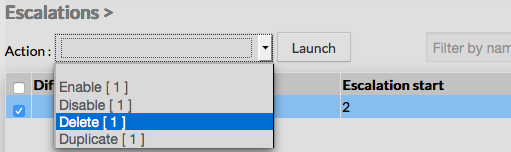 |
From the Main page First go to the Escalations page, from the Main menu, then click on the check box placed on the first column of the table. Use the Action menu on the top to select Delete, and click to the Launch Button. A confirmation popup will be displayed. | 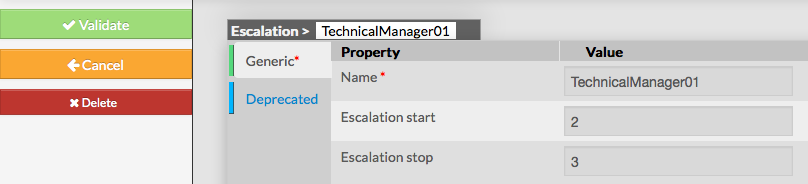 |
| Using the Main page gives Administrators ability to Delete many Escalations at once. | |
| | |
Duplicate an escalation |
| Duplication operation is very useful when similar Escalations must be added. | |
To duplicate an escalation, first go on the Main page listing all escalations, then select a escalation by clicking on the check box placed on the first column. | |
Once selected, the escalation can be duplicated by selecting Duplicate in the select Action of the tool bar. Duplication is executed by clicking the Launch button. | 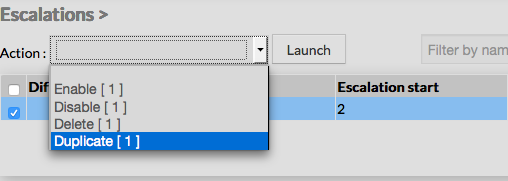 |
| The name of escalation duplicated is suffixed by "(copy)". |  |
Using the Main page gives Administrators ability to Duplicate many Escalations at once. | Info |
|---|
Duplicated Escalations are totally detached and independent of the cloned Escalation. No relation is made in the configuration. |
|