...
Acknowledge
This button opens the same modal form explained in Hud (State Summary : 4 )Recheck Now
This button schedules an instant check like the button explained in Hud (State Summary : 3)
Downtime
If no downtime for the host, the list is empty (like the first image in 'overview'), else a list of scheduled downtimes is shown:
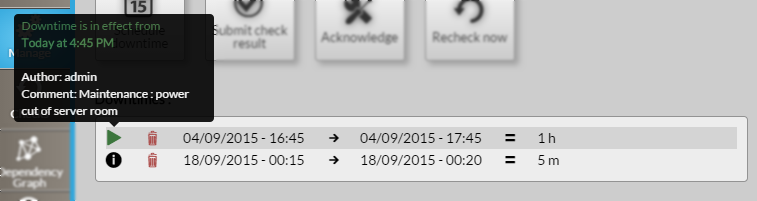
For each downtime in list : Start Date/Time → End Date/Time = Duration
The first icon  , on hover, shows the author of the downtime and the comment given (like explained in "Action Buttons : Schedule downtime").
If a downtime is in effect :
- it will be specified in this tooltip
- the icon is replaced by
 icon (like shown in this picture, in green).
 - the status in the Hud (State Summary : second zone) has changed like this:

Delete a downtime :
To delete a downtime, you just have to click on bin icon  in the desired downtime row.