Description
When a check is defined, its A check is based on a specific command available in you your Shinken Enterprise environementenvironment.
Some of the available commands will provide more details than only just the status. These information are called metrics.
The metric values are stored in Shinken Enterprise after every checks check run.
The Widget Graphs will be able to display all metrics of a check from a chosen host, for the last 24 hours (like CPU, RAM, response time, …) from a chosen host.
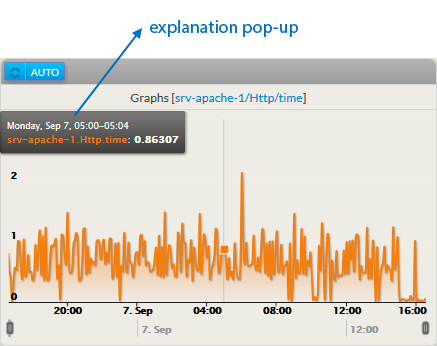
- Moving the mouse on the graph will display a black an explanation pop-up (in a black box):
- This pop-up contains displays the date + time and a time plus the corresponding metric value of the metric at this moment.
- The mouse position of the mouse correspond to the time line at the bottom of the graph
|  |
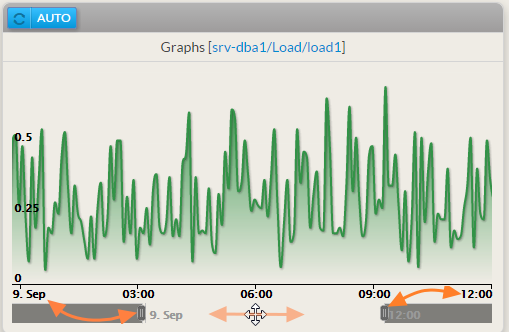
- Up The graph can display up to 1 day values will be displayed in the graph day values (24 hours).:
- You can reduce the period displayed by moving the 2 sliders
- Once the range reduced, you You can move the this reduced range along the 24 hours scale.
|  |
Configuration
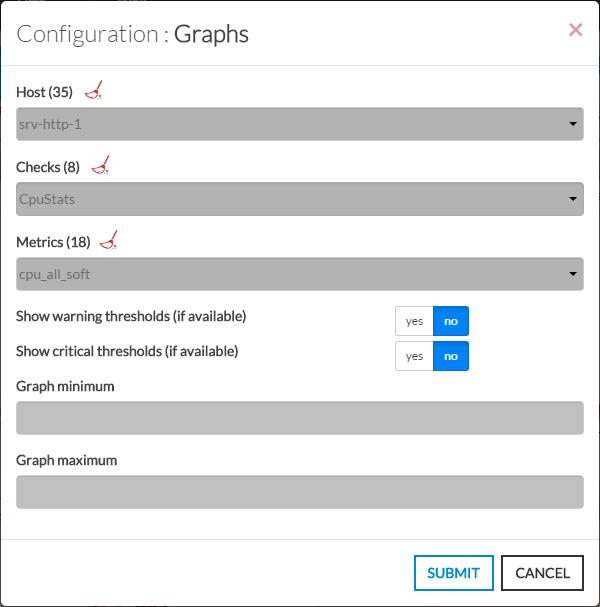
Graphs widget is related to a metric, which relies on an Host's check. So you need to set first the Host itself, then the relevant check, finally you can specify which metric you might want to see in the graph .
These are the required steps to accomplish configuration for configure a graph Graphs widget.
- Open the configuration box:
- Type the host in the edit field under Host.
- The total number of host and cluster will be displayed near host Host (119 35 in our exemple).
- It will automatically show the list of available hosts.
- If you type characters, the list will be automatically filtered.
- As soon as you have typed 1 letter, a matching list of checks will be displayed below.
- Once the host is selected, it will fill in the check area with all available checks with metrics.
- Type or Select the checks.
- Once the check is selected, it will fill in the metrics area with all available metrics.
- Then select the metrics.
- Activate the display of Warning and Critical thresholdthresholds display.
Note: a check may note not have metricmetrics. It depends of the command used to implement the check.
and the metric has value like 125 values under 75
| 
|