Versions Compared

Key

  • This line was added.
  • This line was removed.
  • Formatting was changed.

 Description

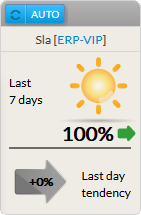
The SLA widget displays the availability Le widget SLA présente le taux de disponibilité (%) of the chosen element de l'élément choisi (cluster, host or hôte ou check) for the last pour les derniers 7 x 24 hoursheures.

2 SLA values are presentvaleurs sont disponibles :

  • Last 7 daysderniers jours:


      • Between Entre 99% to et 100% :
        • Status Statut = OK.
        • Icon Icone = SunSoleil
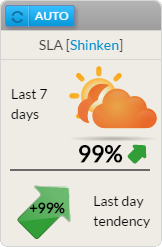
      • Between Entre 97% and et 99% (not included non inclus => 98,9%) :
        • Status Statut = Warning.Icon = Orange clouds hiding the
        • sunIcone = nuages orange cachant le soleil.
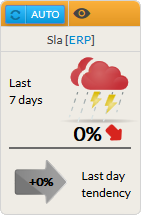
      • Between Entre 0% and et 97% (not included non inclus => 97,9%) :
        • Status Statut = Critical.
        • A red cloud with lightning will be displayednuage rouge avec éclairs apparaîtra.


  • La tendance du jour précédent:
    • présentation du SLA du jour précédent
    The previous day trend:
    • It displays the SLA trend during the last day.


...

Utilisation

As the SLA refers to the availability of an element, a click on the widget will open the Detail panel of this element in the historic tab (see the Host Detail View and History Tab chapter for more detailsLe SLA faisant référence au taux de disponibilité d'un élément, un click sur le widget ouvrira le panneau détail de cet élément (voir les chapitres Host Detail View et History Tab ).


Configuration

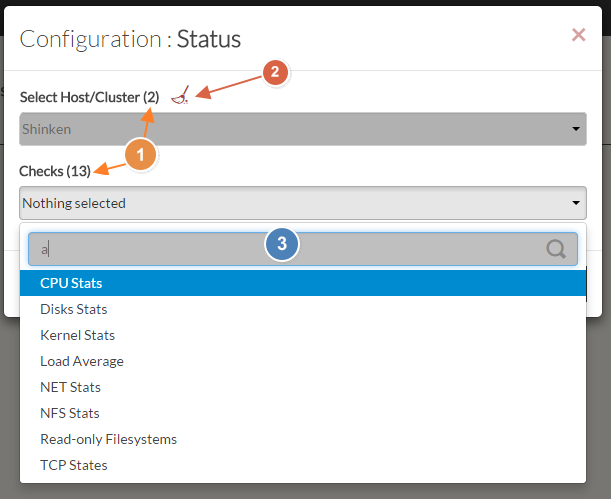
  1. Select a host or cluster name in the first list.
    • The total number of hosts and clusters will be displayed near "Select Host/Cluster" (1).
    • If no host selected yet, the list of available hosts will automatically opened.
    • You can search (filter) for a host name, typing into the input on top of the list (3).
    • You can clean the current selection by clicking on the swipe icon (2).

  2. Once your element is selected, if you want to monitor a specific check, you just have to select check name inside the second list.

  3. When configured, press the SUBMIT button.

...