Description
Pour des raisons pratiques, on veut pouvoir visualiser rapidement l'état de plusieurs hôtes. Si c'est facile avec 3 hôtes, cela peut rapidement devenir compliqué sont on dispose d'un grand nombre d'hôtes qui ont des relations entre eux.
Pour résoudre ce problème, on crée un cluster, qui est un élément agrégeant l'état de plusieurs autres éléments (hôtes, checks mais aussi d'autres clusters).
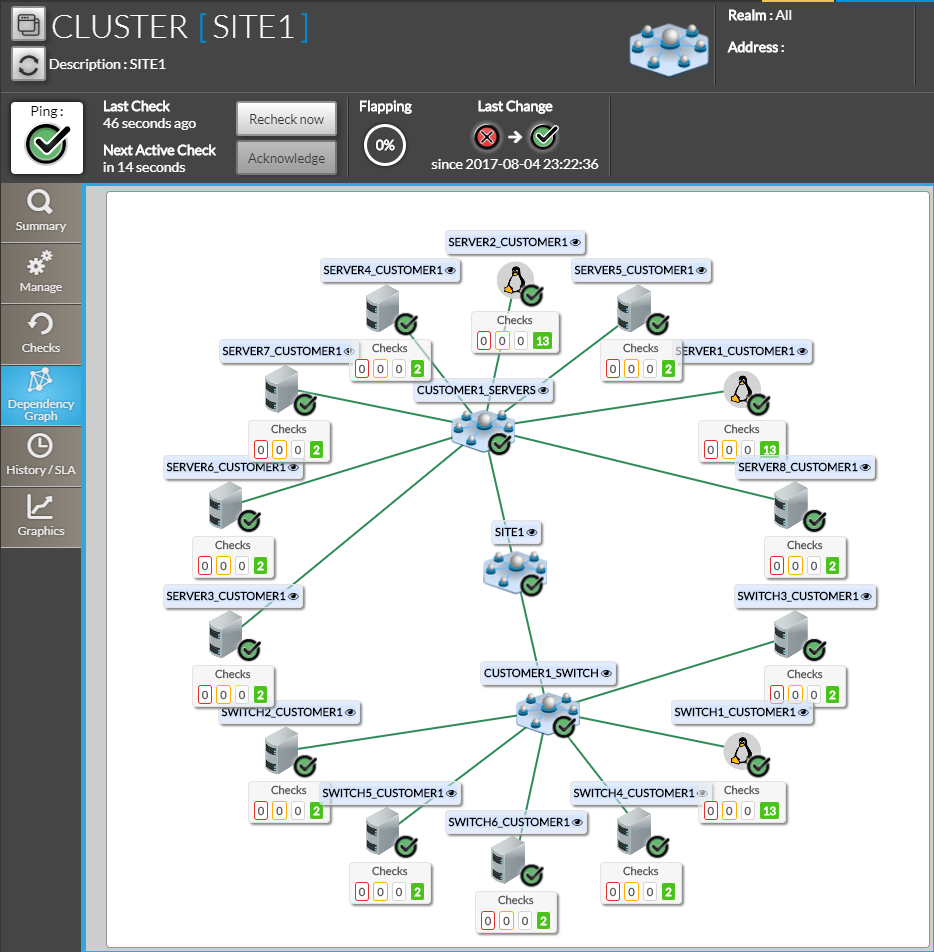
Dans l'exemple ci-contre, le cluster "SITE1" agrège l'état d'un certain nombre d'hôtes. On peut s'en servir pour visualiser rapidement l'état des serveurs présents sur un site d'exploitation ainsi qu'en obtenir un historique et des SLA.
Aussi, on peut également visualiser quels éléments composent le cluster, et ainsi détecter plus facilement la source d'un problème grâce à cette vue synthétique.
Les clusters partagent de nombreuses propriétés avec les autres éléments de Shinken Entreprise (hôtes et checks).
- Ils possèdent un statut (OK, Critique, Attention, Inconnu).
- Ils peuvent avoir un contexte (Période de maintenance, Prise en compte ou Instabilité).
- et peuvent de la même manière avoir des notifications.
La création et la configuration d'un cluster est effectuée par les administrateurs de Shinken Entreprise.
For practical reasons, we want to be able to quickly view the status of several hosts. If it's easy with 3 hosts, it can quickly become complicated when you have a large number of hosts that have relationships with each other.
To solve this problem, we create a cluster, which is an element aggregating the state of several other elements ( hosts, checks but also other clusters ).
In this example, the "SITE1" cluster aggregates the status of a number of hosts. It can be used to quickly visualize the status of the servers present on an operating site as well as obtain a history and SLAs.
It is also possible to visualize which elements make up the cluster, and thus more easily detect the source of a problem thanks to this synthetic view..
Clusters share many properties with the other elements of Shinken Enterprise (hosts and checks).
- They have a status (OK, Critical, Warning, Unknown)..
- IThey can have a context ( DOWNTIME, ACKNOWLEDGD, or FLAPPING ).
- and may similarly have notifications.
The creation and configuration of a cluster is done by Shinken Enterprise administrators in the configuration UI.
| Panel |
|---|
|
Cluster specifics
Although clusters share many properties with hosts, some behaviors are more complex, such as the management of contexts.
Partial contexts
Clusters can have contexts that are called partial contexts..
When an element of a cluster enters, for example, a DOWNTIME Period, we want to be able to see it directly on the cluster, which is supposed to provide us with an aggregated view of its elements.
It must also be possible to differentiate between the presence of a Maintenance Period on one of the elements and the presence of a Maintenance Period on the cluster itself. This is what the partial contexts are used for..
In concrete terms, the difference between a partial context and a standard context is as follows:
- Standard context: The context is positioned directly on the cluster.
- Partial context: The context is located on one or more elements of the cluster. If a context is positioned on ALL the elements of the cluster, then we have a standard context on the cluster.
The different partial contexts that exist in Shinken are therefore as follows
| Panel |
|---|
|
Spécificités liées aux clusters
Les clusters partagent de nombreuses propriétés avec les autres éléments supervisés (statuts, contextes, notifications).
Vu leur nature, certains comportements sont toutefois plus complexes, comme la gestion des contextes.
Les contextes partiels
Les clusters peuvent avoir des contextes qu'on appelle partiels.
Lorsqu'un élément d'un cluster passe par exemple en Période de maintenance, on veut pouvoir le voir directement sur le cluster, qui est sensé nous fournir une vue agrégée de ses éléments.
Il faut aussi pouvoir différencier la présence d'une Période de maintenance sur un des éléments et la présence d'une Période de maintenance sur le cluster en lui même. C'est ce à quoi servent les contextes partiels.
Concrètement, la différence entre un contexte partiel et un contexte standard est la suivante:
- Contexte standard: Le contexte est positionné directement sur l'élément (ici un cluster)
- Contexte partiel: Le contexte est positionné sur un ou plusieurs éléments du cluster. Si un contexte est positionné sur TOUS les éléments du cluster, on a alors un contexte standard sur le cluster.
Les différents contextes partiels qui existent dans Shinken sont donc les suivants:
| Icone | Nom | Description |
|---|---|---|
 | PARTIAL DOWNTIME | Un ou plusieurs éléments du cluster sont en période de One or more elements of the cluster are undergoing maintenance. |
| PARTIAL FLAPPING | Un ou plusieurs éléments du cluster sont instablesOne or more elements of the cluster are unstable. |
| PARTIAL ACKNOWLEDGE | Un ou plusieurs éléments du cluster ont été pris en compte par des utilisateurs de Shinken Enterprise. |


L'ordre de priorité des contextes
| or more elements of the cluster have been taken into account by users. |
The order of priority for contexts
The priority table of contexts presented in the Concept: Status & Context page can then be completed with partial contextsLe tableau de priorité des contextes présenté dans la page Notion: Statut & Contexte peut alors être complété avec les contextes partiels.
| Icone | Nom | Description |
|---|---|---|
| Aucun contexteL'élément n'a aucun contexte particulier. Le statut fournit à lui seul les informations permettant de décrire le fonctionnement de l'élément | The element has no particular context. The status alone provides the information to describe how the element works. | |
| DOWNTIMEL'élément a été placé sous maintenance par un utilisateur de Shinken Entreprise | The item has been placed under maintenance by a user. |
| PARTIAL DOWNTIME | Un ou plusieurs éléments du cluster sont en période de One or more elements of the cluster are undergoing maintenance. |
| FLAPPINGLe statut de l'élément change très souvent. L'élément est instable et Shinken ne peut pas déterminer de manière fiable son statut | The status of the element changes very often. The element is unstable and Shinken cannot reliably determine its status. |
| PARTIAL FLAPPING | Un ou plusieurs éléments du cluster sont instablesOne or more elements of the cluster are unstable. |
| ACKNOWLEDGEDL'élément est dans un statut différent de OK. Le problème a été remarqué et pris en compte par un utilisateur de | Shinken EntrepriseThe item is in a status other than OK. The problem has been noticed and taken into account by a user.. |
| PARTIAL ACKNOWLEDGE | Un ou plusieurs éléments du cluster ont été pris en compte par des utilisateurs de Shinken Enterprise. |



Le résultat du check d'un cluster
| One or more elements of the cluster have been taken into account by users. |
The result of a cluster verification
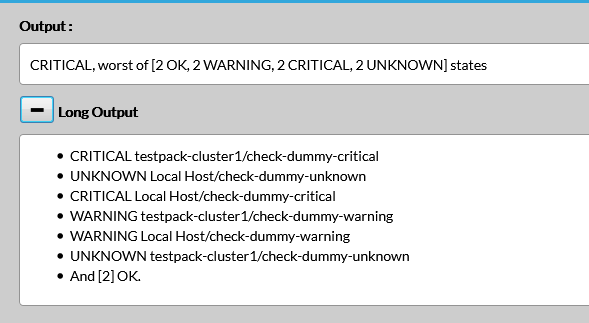
The result of the check of a cluster gives details on how the final status is calculated from the status of its elements.
- The result gives the calculation rule, and a summary version of the status of the elements. Here, we can see that the status of the cluster is CRITICAL, because it is the worst status among the status of all the elements in the cluster.
- The long result gives the status of each of the elements of the cluster.
Le résultat du check d'un cluster donne les précisions sur la manière dont le statut final est calculé à partir du statut de ses éléments.
- Le résultat donne la règle de calcul, et une version résumée du statut des éléments. Ici, on peut voir que le statut du cluster est CRITICAL, car c'est le pire statut parmi le statut de tous les éléments du cluster
- Le résultat long donne le statut de chacun des éléments du cluster
| Panel |
|---|
|