Introduction
Shinken Enterprise can be configured to support distributed monitoring of network checks and resources.
The goal in the distributed monitoring environment is to offload the overhead (CPU usage, etc.) of performing and receiving checks from a "central" server onto one or more "distributed" servers. Most small to medium size shops will not have a real need for setting up such an environment. However, when you want to start monitoring thousands of hosts (and several times that many checks) using Shinken Enterprise , this becomes quite important.
The global architecture
Shinken Enterprise's architecture has been designed according to the Unix Way: one tool, one task.
Shinken Enterprise has an architecture where each part is isolated and connects to the others via standard interfaces. Shinken Enterprise is based on the a HTTP backend. This makes building a highly available or distributed monitoring architecture quite easily.
Shinken core uses distributed programming, meaning a daemon will often do remote invocations of code on other daemons, this means that to ensure maximum compatibility and stability, the core language, paths and module versions must be the same everywhere a daemon is running.
Shinken Enterprise Daemon roles
This part is described on the daemon page.
The smart and automatic load balancing
Shinken Enterprise is able to cut the user configuration into parts and dispatch it to the schedulers. The load balancing is done automatically: the administrator does not need to remember which host is linked to another to create shards, Shinken Enterprise does it for him.
The dispatch is a host-based one: that means that all checks of a host will be in the same scheduler than this host. The major advantage of Shinken Enterprise is the ability to create independent configurations: an element of a configuration will not have to call an element of another shard. That means that the administrator does not need to know all relations among elements like parents, hostdependencies or check dependencies: Shinken Enterprise is able to look at these relations and put these related elements into the same shards.
This action is done in two parts:
- create independent shards of elements
- paste shards to create N configurations for the N schedulers
Creating independent shards
The cutting action is done by looking at two elements: hosts and checks. checks are linked with their host so they will be in the same shard. Other relations are taken into account :
- parent relationship for hosts (like a distant server and its router)
- hostdependencies
Shinken Enterprise looks at all these relations and creates a graph with it. A graph is a relation shard. This can be illustrated by the following picture :
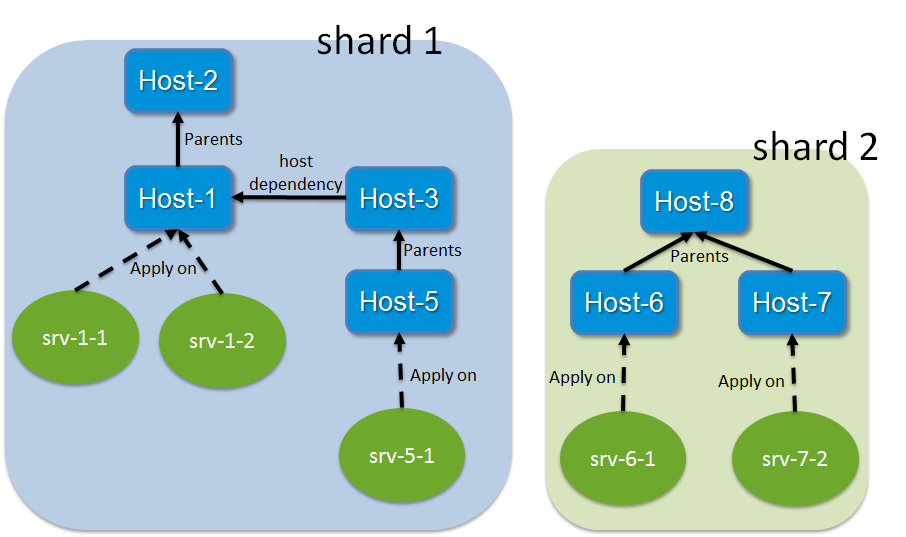
In this example, we will have two shards:
- shard 1: Host-1 to host-5 and all their checks
- shard 2: Host-6 to Host-8 and all their checks
The shards aggregations into scheduler configurations
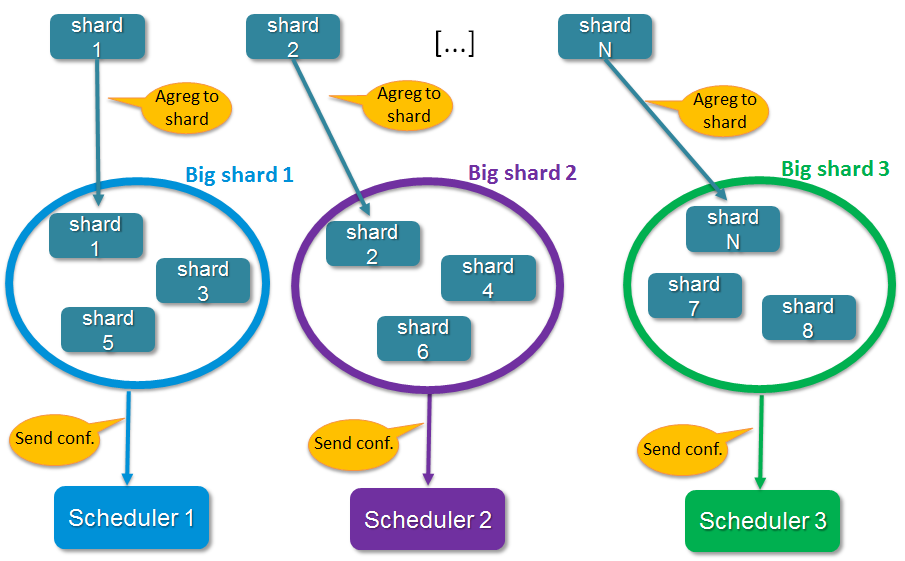
When all relation shards are created, the Arbiter aggregates them into N configurations if the administrator has defined N active schedulers (no spares). shards are aggregated into configurations (it's like "Big shards"). The dispatch looks at the weight property of schedulers: the higher weight a scheduler has, the more shards it will have. This can be shown in the following picture :
The configurations sending to satellites
When all configurations are created, the Arbiter sends them to the N active Schedulers. A Scheduler can start processing checks once it has received and loaded it's configuration without having to wait for all schedulers to be ready(v1.2). For larger configurations, having more than one Scheduler, even on a single server is highly recommended, as they will load their configurations(new or updated) faster. The Arbiter also creates configurations for satellites (pollers, reactionners and brokers) with links to Schedulers so they know where to get jobs to do. After sending the configurations, the Arbiter begins to watch for orders from the users and is responsible for monitoring the availability of the satellites.
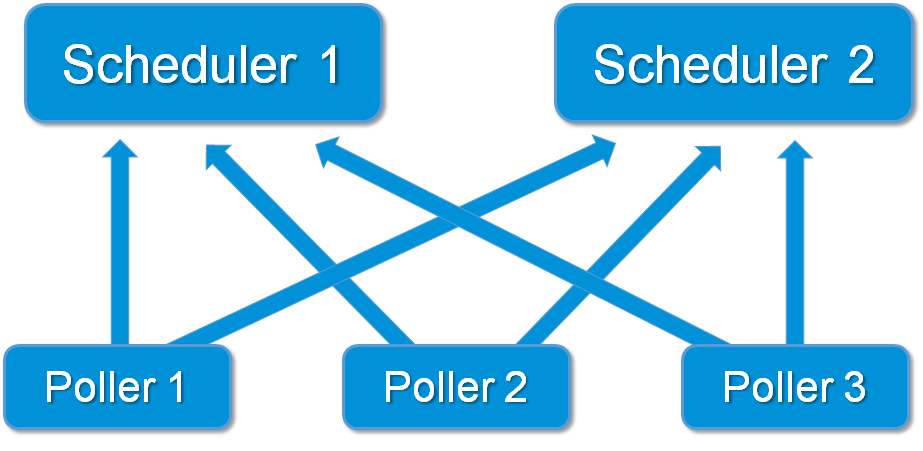
Pollers connections with more than one scheduler
The high availability
The Shinken Enterprise architecture is a high availability one. Before looking at how this works,let's take a look at how the load balancing works if it's now already done.
When a node dies
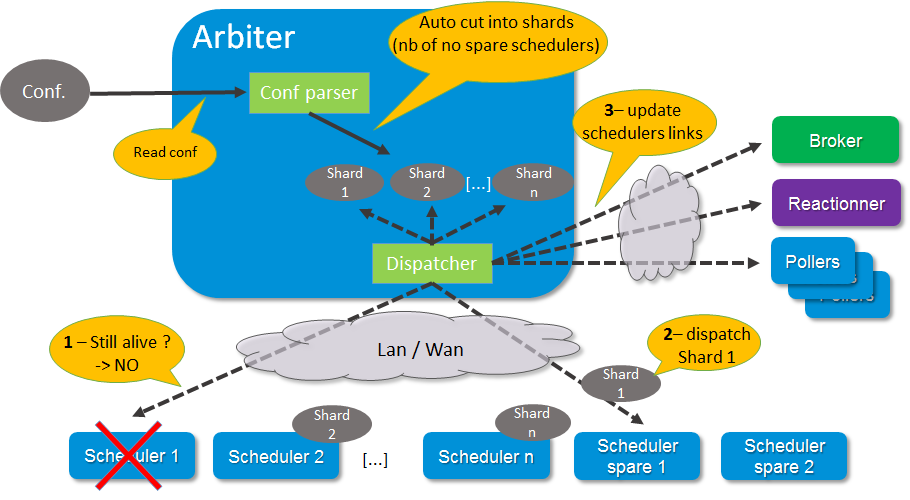
Nobody is perfect. A server can crash, an application too. That is why administrators have spares: they can take configurations of failing elements and reassign them. The Arbiter regularly checks if everyone is available. If a scheduler or another satellite is dead, it sends its conf to a spare node, defined by the administrator. All satellites are informed by this change so they can get their jobs from the new element and do not try to reach the dead one. If a node was lost due to a network interruption and it comes back up, the Arbiter will notice and ask the old system to drop its configuration.
The availability parameters can be modified from the default settings when using larger configurations as the Schedulers or Brokers can become busy and delay their availability responses. The timers are aggressive by default for smaller installations. See daemon configuration parameters for more information on the three timers involved.
This can be explained by the following picture :
External commands dispatching
The administrator needs to send orders to the schedulers (like a new status for passive checks). In the Shinken Enterprise way of thinking, the users only need to send orders to one daemon that will then dispatch them to all others. In Nagios the administrator needs to know where the hosts or checks are to send the order to the right node. In Shinken Enterprise the administrator just sends the order to the Arbiter, that's all. External commands can be divided into two types :
- commands that are global to all schedulers
- commands that are specific to one element (host/check).
For each command, Shinken Enterprise knows if it is global or not. If global, it just sends orders to all schedulers. For specific ones, it searches which scheduler manages the element referred by the command (host/check) and sends the order to this scheduler. When the order is received by schedulers they just need to apply them.
Different types of Pollers: poller_tag
The current Shinken Enterprise architecture is useful for someone that uses the same type of poller for checks. But it can be useful to have different types of pollers, like GNU/Linux ones and Windows ones. We already saw that all pollers talk to all schedulers. In fact, pollers can be "tagged" so that they will execute only some checks.
This is useful when the user needs to have hosts in the same scheduler (like with dependencies) but needs some hosts or checks to be checked by specific pollers (see usage cases below).
These checks can in fact be tagged on 3 levels :
- Host
- Check
- Command
The parameter to tag a command, host or check, is "poller_tag". If a check uses a "tagged" or "untagged" command in a untagged host/check, it takes the poller_tag of this host/check. In a "untagged" host/check, it's the command tag that is taken into account.
The pollers can be tagged with multiple poller_tags. If they are tagged, they will only take checks that are tagged, not the untagged ones, unless they defined the tag "None".
Use cases
This capability is useful in the DMZ case.
In the first case, it can be useful to have a windows box in a domain with a poller daemon running under a domain account. If this poller launches WMI queries, the user can have an easy Windows monitoring.
The second case is a classic one: when you have a DMZ network, you need to have a dedicated poller that is in the DMZ, and return results to a scheduler in LAN. With this, you can still have dependencies between DMZ hosts and LAN hosts, and still be sure that checks are done in a DMZ-only poller.
Different types of Reactionners: reactionner_tag
Like for the pollers, reactionners can also have 'tags'. So you can tag your host/check or commands with
"reactionner_tag". If a notification or an event handler uses a "tagged" or "untagged" command in a untagged host/check, it takes the reactionner_tag of this host/check. In a "untaged" host/check, it's the command tag that is taken into account.
The reactionners can be tagged with multiple reactionner_tags. If they are tagged, they will only take checks that are tagged, not the untagged ones, unless they defined the tag "None".
Like for the poller case, it's mainly useful for DMZ/LAN
Advanced architectures: Realms
Shinken Enterprise's architecture allows the administrator to have a unique point of administration with numerous schedulers, pollers, reactionners and brokers. Hosts are dispatched with their own checks to schedulers and the satellites (pollers/reactionners/brokers) get jobs from them. Everyone is happy.
Or almost everyone. Think about an administrator who has a distributed architecture around the world. With the current Shinken Enterprise architecture the administrator can put a couple of scheduler/poller daemons in Europe and another set in Asia, but he cannot "tag" hosts in Asia to be checked by the asian scheduler . Also trying to check an asian server with an european scheduler can be very sub-optimal, read very sloooow. The hosts are dispatched to all schedulers and satellites so the administrator cannot be sure that asian hosts will be checked by the asian monitoring servers.
In the normal Shinken Enterprise Architecture,it is useful for load balancing with high availability, for single site.
Shinken Enterprise provides a way to manage different geographic or organizational sites.
We will use a generic term for this site management, Realms.
Realms in few words
A realm is a pool of resources (scheduler, poller, reactionner and broker) that hosts or hostgroups can be attached to. A host or hostgroup can be attached to only one realm. All "dependancies" or parents of this hosts must be in the same realm. A realm can be tagged "default"' and realm untagged hosts will be put into it. In a realm, pollers, reactionners and brokers will only get jobs from schedulers of the same realm.
Realms are not poller_tags!
Make sure to undestand when to use realms and when to use poller_tags.
- realms are used to segregate schedulers
- poller_tags are used to segregate pollers
For some cases poller_tag functionality could also be done using Realms. The question you need to ask yourself: Is a poller_tag "enough", or do you need to fully segregate a the scheduler level and use Realms. In realms, schedulers do not communicate with schedulers from other Realms.
- If you just need a poller in a DMZ network, use poller_tag.
- If you need a scheduler/poller in a customer LAN, use realms.
Sub realms
A realm can contain another realm. It does not change anything for schedulers: they are only responsible for hosts of their realm not the ones of the sub realms. The realm tree is useful for satellites like reactionners or brokers: they can get jobs from the schedulers of their realm, but also from schedulers of sub realms. Pollers can also get jobs from sub realms, but it's less useful so it's disabled by default. Warning: having more than one broker in a scheduler is not a good idea. The jobs for brokers can be taken by only one broker. For the Arbiter it does not change a thing: there is still only one Arbiter and one configuration whatever realms you have.
Example of realm usage
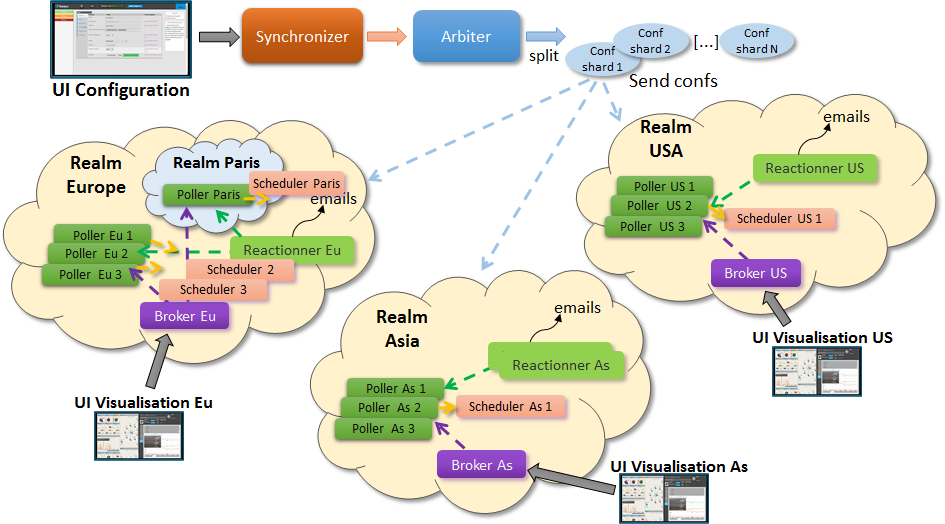
Let's take a look at two distributed environnements. In the first case the administrator wants totally distinct daemons. In the second one he just wants the schedulers/pollers to be distincts, but still have one place to send notifications (reactionners) and one place for database export (broker).
Distincts realms :
More common usage, the global realm with reactionner/broker, and sub realms with schedulers/pollers:
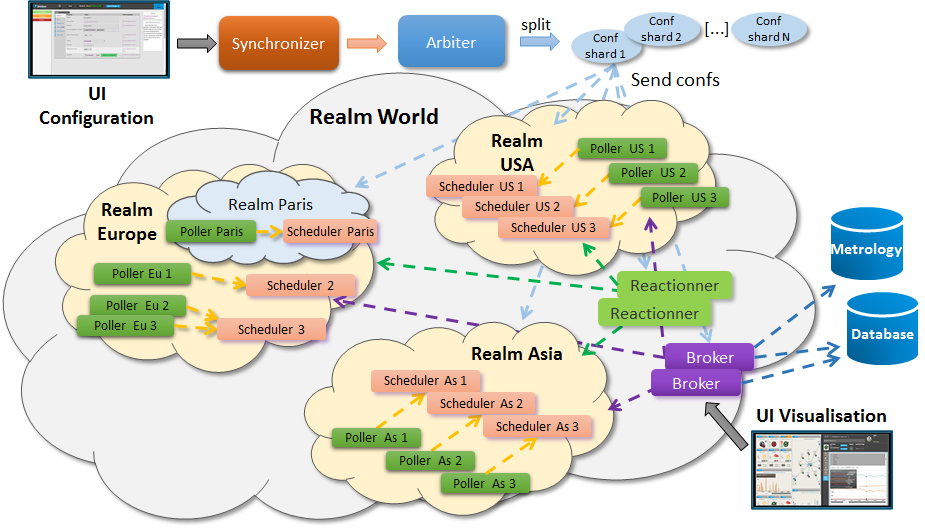
Satellites can be used for their realm or sub realms too. It's just a parameter in the configuration of the element.